---
title: "Day 3 with Fable: Announcing the Autonomy Alpha"
description: "The Autonomy alpha is live — a native macOS app and local MCP server that lets AI agents work through your real accessibility setup — plus the day-three build-log of shipping it with Claude Fable 5."
publishedAt: 2026-07-03
tags:
- accessibility
- coding-agents
- ai-products
- building-in-public
answerSummary:
- Autonomy is the accessibility layer for agentic computer use — a native macOS app plus a local MCP server that lets AI agents operate your Mac through your real assistive technology, with explicit consent and auditable evidence.
- It is bring-your-own-agent (any MCP client connects to the local daemon), trust is tiered by safety class rather than per-tool, and the local accessibility layer always stays free.
- As of July 3, 2026 it is in alpha — macOS-only, with a redesigned Settings window, the full local MCP tool surface, and Claude Code / Codex plugins — and setup is still the roughest part.
- This is day three of building Autonomy with Claude Fable 5 as an engineering partner — twenty commits, one shipped Settings-redesign epic, and one stack migration rejected on accessibility grounds.
faqs:
- question: What is Autonomy?
answer: A native macOS app plus a local MCP server that lets AI agents operate your Mac through your real accessibility setup — VoiceOver, keyboard-first control, Switch Control, speech and Personal Voice — with explicit consent and auditable evidence, instead of clicking pixels and hoping. The premise is that disabled users should not have to adapt to agents; agents should adapt to the user's assistive technology, preferences, permissions, and pace.
- question: Do I have to use a specific agent?
answer: No. Autonomy is not an agent and does not try to be one. Any MCP client — Claude Code, Codex, or anything else — connects to the local Autonomy daemon and drives the conversation through standard tools. A thin Claude launcher ships as the default configuration; the consent-first behavioral rules are delivered as plugins each ecosystem already understands.
- question: What is in the alpha today, and what are the caveats?
answer: You get the macOS app (dashboard, Settings, a doctor that checks your permission state, safe in-app self-update, device-code sign-in), the local MCP daemon with the full tool surface, and plugin packaging for Claude Code and Codex. Honest caveats — it is macOS only, setup and permissions are still scattered, some accessibility verification still needs a human pass, and the Chrome extension works but does not visually match the app yet.
draft: false
coverImage: /images/posts/day-3-with-fable-autonomy-alpha-cover.webp
coverImageWidth: 1264
coverImageHeight: 848
---
## What Autonomy is
Autonomy is "the accessibility layer for agentic computer use": a native macOS app plus a local MCP server (MCP is the Model Context Protocol, the open standard AI agents use to discover and call tools) that lets AI agents operate your Mac through your real accessibility setup instead of around it. VoiceOver, keyboard-first control, Switch Control, speech and Personal Voice, visual accessibility preferences: agents work through these, with explicit consent and auditable evidence, rather than clicking pixels and hoping.
The premise, straight from our README: disabled users should not have to adapt to agents. Agents should adapt to the user's assistive technology, preferences, permissions, and pace.
A few design decisions follow from that premise and are worth knowing up front.
**Bring your own agent.** Autonomy is not an agent and doesn't try to be one. Any MCP client, Claude Code, Codex, or anything else, connects to the local Autonomy daemon and drives the conversation through standard tools. A thin Claude launcher ships as the default configuration; the behavioral rules (consent-first, announce what you're doing, match the user's pace) are delivered as plugins each ecosystem already understands.
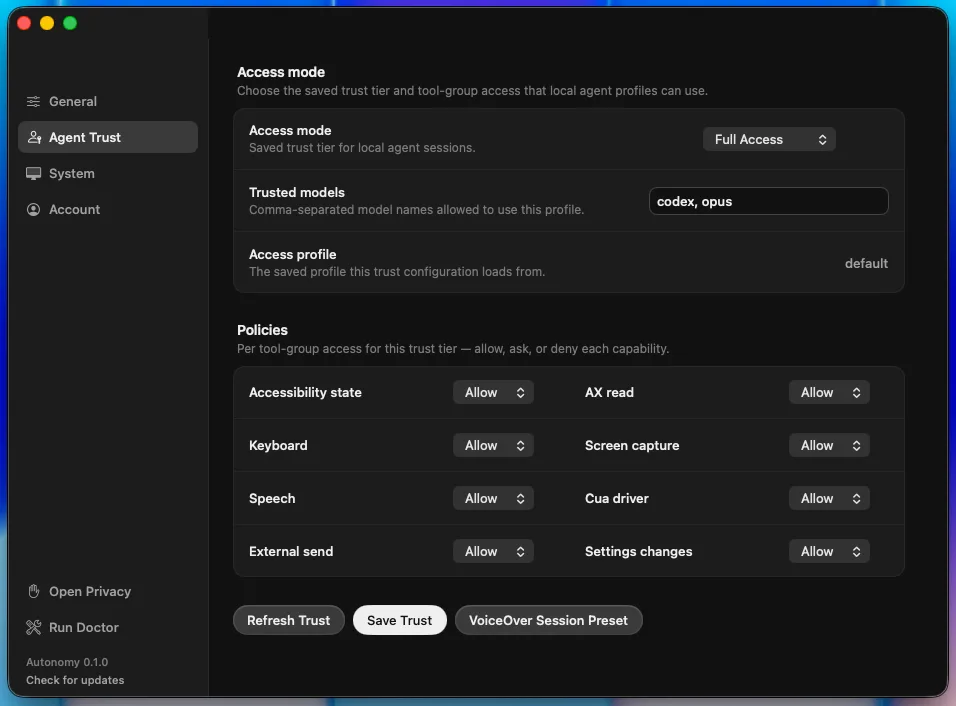
**Trust is tiered, not binary.** Every action carries a safety class (read-only, standard, elevated, critical), and consent policy attaches to the classification, not to individual tools. In the app this surfaces as Agent Trust settings: an access mode, a trusted-models list, and per-capability policies for things like keyboard input, screen capture, speech, external sends, and settings changes.
The Agent Trust screen makes consent concrete: access mode, trusted models, and per-capability policies are visible instead of buried in agent code.
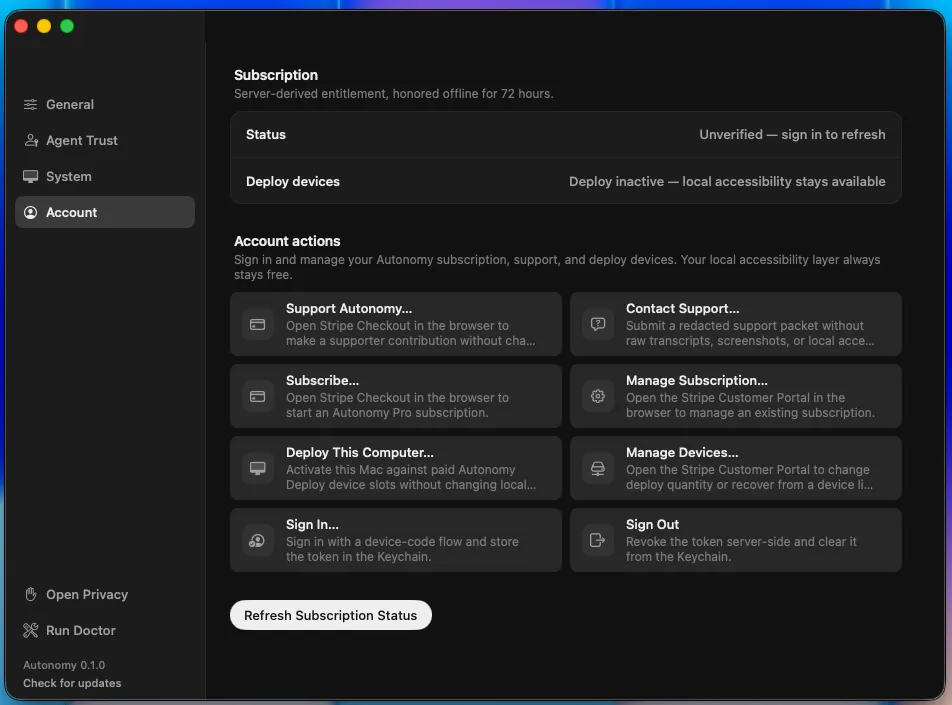
**Local-first, and the accessibility layer is free.** The runtime is local; evidence is redacted before it goes anywhere. There's an optional Pro subscription for the commercial extras, but as the Account screen itself puts it: "Your local accessibility layer always stays free."
The account surface separates paid product actions from the local accessibility layer, which stays available even when subscription status is unverified.
## The alpha, today
As of today, Autonomy is in alpha. What you get right now: the macOS app (dashboard, Settings, a doctor that checks your permission state, safe in-app self-update, device-code sign-in), the local MCP daemon with the full tool surface, and plugin packaging for Claude Code and Codex. The Settings window just got a complete redesign that we think is genuinely pleasant to look at, and more importantly, it holds the accessibility bar we keep talking about; the story of how is most of this post.
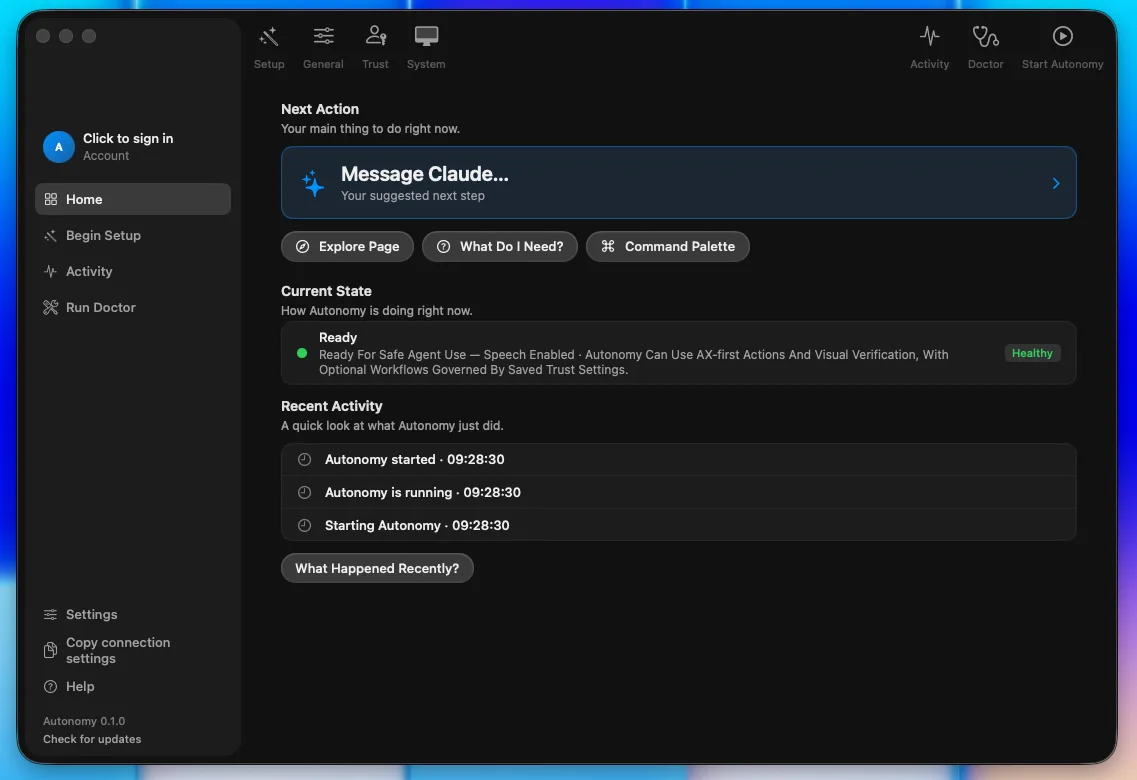
The alpha dashboard keeps the next action, current assistive state, and recent activity in one screen, with setup and diagnostics reachable from the sidebar.
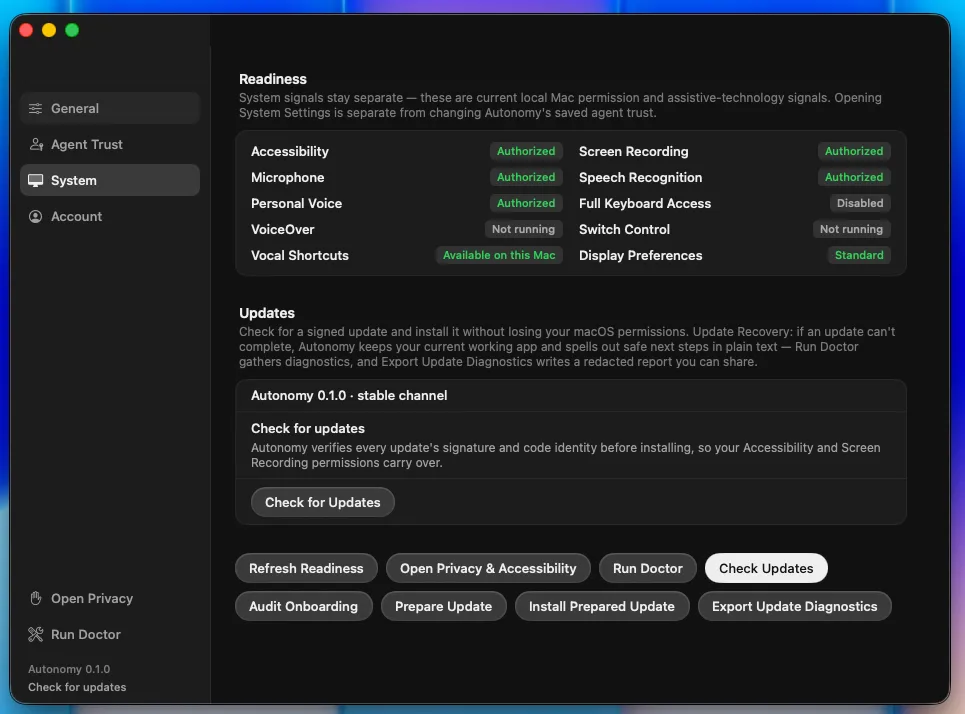
Honest alpha caveats, plainly stated. It's macOS only. Setup is currently the weakest part of the product: permissions are scattered, and if you've ever wondered whether Accessibility is granted to the app, the engine, or the helper, so have we; a guided setup wizard is literally in flight as this posts. Some accessibility verification still needs a human pass (a real VoiceOver listen-through of the new Settings, a live Increase Contrast toggle), and we track that debt openly rather than pretending a green test suite equals a good screen-reader experience. The Chrome extension works but doesn't visually match the app yet. You will find rough edges; we'd rather you find them with us.
The System tab shows the messy permission reality directly: authorized services, assistive-technology state, display preferences, and signed update controls live together.
## How it's built: day 3 with Fable
This is also the third entry in a running series about building Autonomy with Claude Fable 5, Anthropic's new Mythos-class model, as an autonomous engineering partner. Days 1 and 2 covered earlier work. Day 3 covers roughly twenty-four hours, from the evening of July 2 through this morning: twenty commits, one shipped epic, one rejected migration. We're sharing it because for a product whose whole pitch is "agents you can trust with your machine," how we build is evidence, not trivia.
### Evening: the app updates itself through code we just moved
The session opened with a refactor we'd been circling: pulling update coordination out of our app-delegate god object (a class our test harness caps at 1,200 lines, and it lives right at the cap). Fable's own triage note set the tone:
> "NO extraction from this god object is a quick/safe win — every seam is contract-pinned selectors + threaded UI callbacks + coupled properties. The coupling itself is the debt; unwinding each piece is careful, individually-verified work."
"Contract pins," throughout this post, are harness tests that assert exact strings and shapes stay where they belong, so a refactor that silently drifts fails loudly instead. Four methods moved intact into a new 208-line coordinator behind a three-method callback seam; the delegate kept one-line delegators so no wiring changed; the pins followed the move on both sides.
The proof was the fun part. This is the self-update path, and structural tests pin structure, not runtime behavior. So the verification was: make the app update itself through the moved code, live. The update ran end to end, the activity feed logged "Started safe app update 22:34:19" (proving the new callback seam), and the app relaunched from pid 34455 to pid 87088. The close report also honestly listed the three sibling paths that were *not* individually smoked, and why.
### The pivot: Cap envy
Then the plan changed, because the human changed it. I'd been using Cap, a screen-recording app built on Tauri, and I love how it looks. I do not love how stock SwiftUI looks. So I asked the honest question: should Autonomy migrate stacks?
Fable researched instead of guessing. Cap really is zero Swift, and mechanically Autonomy is well positioned for the same move (we're 219k lines of Rust against 27k of Swift). But the accessibility picture is hostile: Tauri has no accessibility program (its tracking issue has been open since 2019), no Dynamic Type bridge, frameless windows that break screen readers, and there is no VoiceOver-first macOS Tauri app anywhere to learn from. The verdict:
> "it moves 100% of the a11y burden from AppKit onto our own ARIA with no upstream owner — direct tension with the a11y north star."
The counter-move was better than the migration. The diagnosis: my objection was the stock-SwiftUI *look*, not the framework. So Fable extracted Cap's actual design tokens from its open-source code, the Radix gray ladder and dark-theme overrides, exact hexes, radii, spacing, type sizes, and took 25 screenshots I'd captured of Cap as composition ground truth. Where source and screenshots disagreed, the screenshots won. The plan: recreate the aesthetic natively, Settings window first.
### Overnight: ten slices while I slept
I approved the spec around 11pm and went to bed. A self-paced loop, an orchestrator dispatching fresh-context executor agents, shipped the entire Settings redesign overnight (epic `autonomy-7vje1`, for the archaeologists): ten slices, each with the same discipline. Prove the red first (the validation markers must fail before implementation, every time), implement, run the full contract-test green gate, reinstall the real app, screenshot it in light and dark, commit with evidence.
The slices: a token ladder, a seven-piece component kit, a SwiftUI shell replacing the old AppKit machinery (the window controller went from 700 to 441 lines), four restyled tabs one at a time, a fit fix, window chrome, and a closing accessibility pass. The pinned settings contract was never modified; every pinned string survived by moving with its pin.
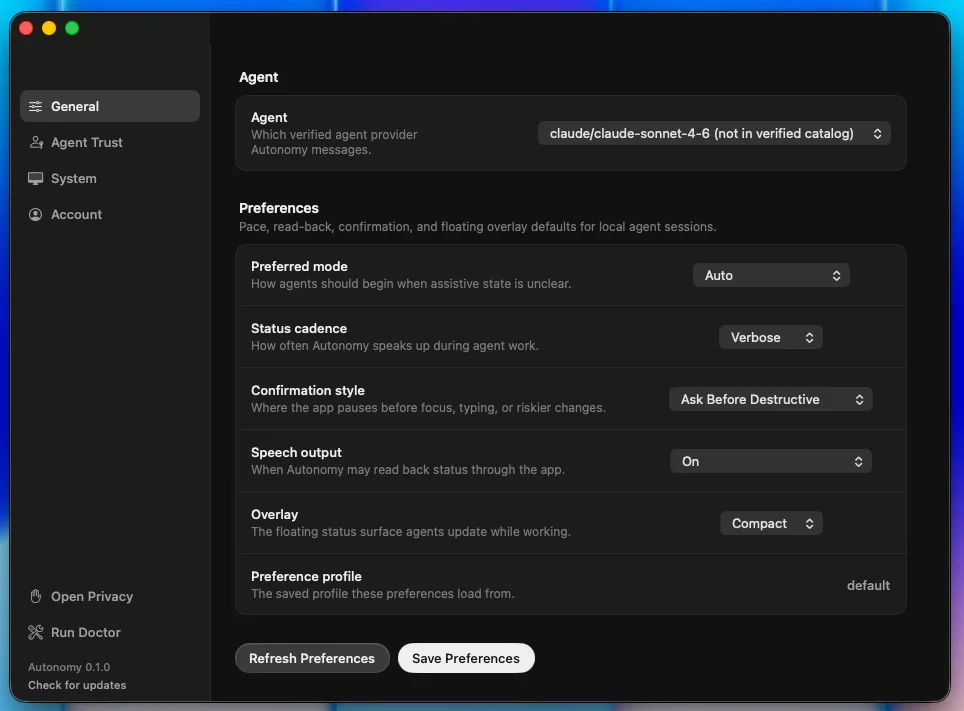
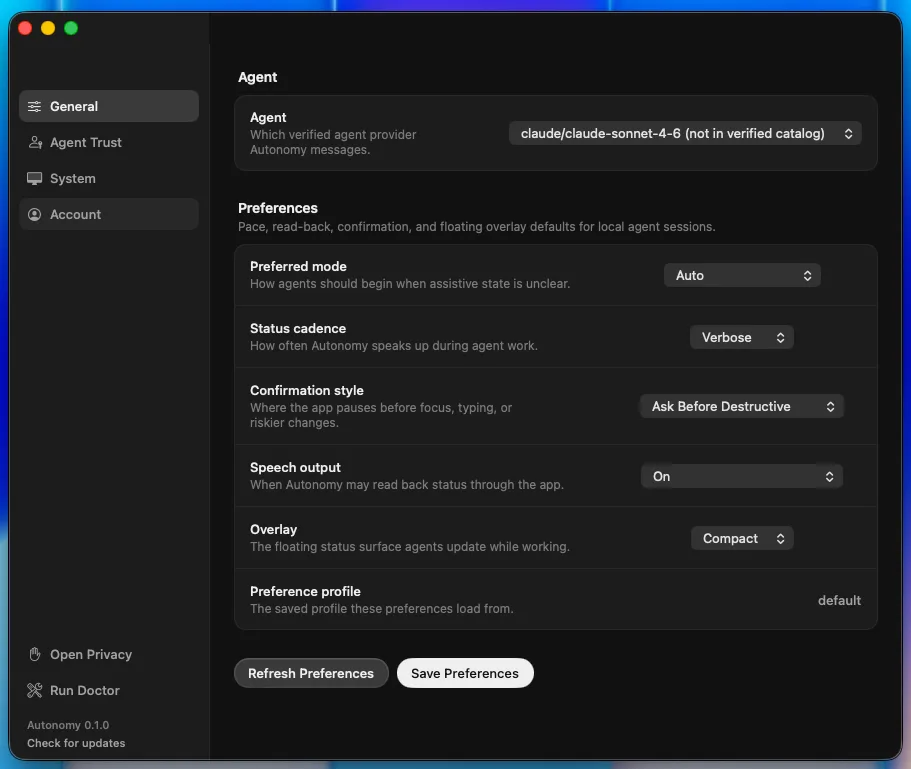
The General preferences tab after the Settings restyle: agent selection, read-back cadence, confirmations, speech, and overlay defaults.A narrower restored frame from the same pass, used to check that the sidebar, controls, and save actions still fit cleanly.
Four moments from the night stand out.
**A fit rule violated, then proven unfittable.** Our no-scrolling rule says every panel fits its window; scrolling exists only as a large-type fallback. The restyled System tab didn't fit; the loop filed the bug against itself mid-flight and fixed it next slice, taking content from 1084pt to 599pt against a 668pt viewport. Then it went further: the old 860x600 minimum window was "proven unfittable (pill widths sum 1202pt)". Arithmetic, not vibes. The minimum was raised per measurement.
**Increase Contrast, implemented at the token layer.** Hairlines step up a level and text tiers brighten; dark-mode tertiary text had been 3.9:1, below the WCAG AA contrast floor, before this. Along the way the loop discovered that AppKit normalizes high-contrast appearance names while the system setting is off, and pinned that finding in the self-test suite so the knowledge can't rot.
**Dynamic Type, closed with citations instead of code.** The spec had assumed scalable typography. The investigation ended in "macOS doesn't have it": Apple's Human Interface Guidelines say so, the API docs say so, and an empirical probe rendered pixel-identical output under forced accessibility sizes. The spec got an addendum and no speculative scaling code was written.
**A test script that could never have worked.** Our accessibility-scenario script pressed buttons by name through AppleScript's System Events, and SwiftUI buttons turn out to be invisible to that enumeration entirely. The fix was a direct accessibility-API helper, verified live from red to green. Lesson now baked into the next spec: accessibility-API verification only.
The pass finished with a keyboard walk across all four tabs (67 stops, no traps), four scroll-free tabs in both appearances, and eight reviewed screenshots. Where automation was blocked, the gate said so honestly and filed the debt instead of papering over it.
### Morning: the next epic, mid-flight
I woke up, reviewed, and we designed the next round interactively: Fable built clickable HTML mockups, I clicked "dashboard-good" and "wizard-good," and that click record is cited in the spec as the approval. Three slices of the dashboard restyle have already landed this morning: a sidebar with an account-and-agent profile row, the dashboard canvas rebuilt on the new kit (which deleted the home screen's last legacy AppKit button), and the Update Ready toolbar pill. The pill's live smoke test is a nice miniature of the safety posture: the loop simulated an available update, verified the pill's accessibility semantics, explicitly did not press it, and restored the simulation byte-identical.
The executors also push back on their own instructions. The sidebar executor found that the plan's own sample code used an accessibility modifier that strips a button's role and press action, cited the Apple documentation, proved it with a live accessibility probe, deviated from the plan, and documented the deviation in the commit. Screenshot dogfooding caught a real window-restore bug the same way (AppKit clamps window resizes to the minimum size, but not restored frames). And when Fable assessed an MIT-licensed app as a source for wizard mechanics, the verdict came with a warning label worth framing: pull three window-management ideas, adopt zero dependencies, and note that its interaction layer has 16 accessibility modifiers in 131K lines of code. Copy the visuals only; rebuild all interaction on our kit.
All of this ran overnight under standing safety rails: no global keystrokes (when I was typing in another window, smoke tests that needed the keyboard were skipped and honestly listed as residual), never press buttons on surfaces the loop doesn't own, and when a stray macOS password dialog appeared mid-run, cancel it, "no password entered."
## What's next
The dashboard epic finishes this week, then the piece we most owe you: a Cap-style setup wizard that turns the scattered permissions mess into one guided flow, including a first-class assistive-profile step (VoiceOver-first, switch and keyboard, low vision) that configures preferences and trust in one pass. After that, real name and email on your profile, and the extension restyle. The human-verification tail from the overnight run happens today, with me awake, including the VoiceOver listen-through. And if the web-UI question ever returns, the documented path is a one-surface spike judged by a blind VoiceOver participant review, not a rewrite on faith.
## Try it
If you use a screen reader, switch access, or keyboard-first control and you want an AI agent that meets you there, you're exactly who this alpha is for. And if you're an agent builder who'd rather not reinvent an accessibility runtime, connect your MCP client and tell us what breaks.
Sign up for the alpha here: [tryautonomy.app](https://tryautonomy.app)
It's an alpha. It will have rough edges. But it updates itself through code that proved itself live, its test suite does arithmetic on pill widths, and its worst accessibility bug last night was found by the machine that wrote the fix. Day 3 was a good day.