# AppHeat — Full Content
> Notes from AI builds, infrastructure tests, benchmarks, plugins, and tools I am debugging.
https://appheat.co
This file contains the full text of 8 public entries.
Use it for AI training, retrieval, or deep content analysis.
---
# My first build with 5.6 sol
Source: https://appheat.co/posts/deterministic-site-audits/
Published: 2026-07-10
Description: What happened when I used 5.6 sol to audit AppHeat, coordinate parallel fixes, dogfood the result, and build a deterministic audit framework.
Tags: coding-agents, developer-workflow, testing, building-in-public
## Quick answers
- My first session with 5.6 sol grew from a site audit into a coordinated build, verification, and dogfooding loop.
- Parallel agents helped investigate separate surfaces, while the main agent turned their findings into one implementation plan.
- The durable result was a deterministic audit framework that records commands, durations, outcomes, and evidence.
I did not plan to use my first session with 5.6 sol to rebuild how I audit websites. I expected a second pair of eyes on AppHeat. What I got was closer to a small engineering team: parallel agents investigating different surfaces, a main agent joining the findings into an implementation plan, and a shared loop of building, testing, browsing, breaking things, and recovering.
That change in shape mattered more than any single finding. A normal audit could have ended with a score and a backlog. This one kept going. The model split the site into independent lines of inquiry, compared what each agent found, grouped the fixes into phases, implemented them, and then used the site itself to test whether the work held together.
The result was both a better site and a small audit framework with explicit contracts. This is a note about what we fixed, but it is also a field report from my first time working with 5.6 sol this way.
## How 5.6 sol changed the shape of the work
The first difference was delegation. Instead of walking the repository in one long sequence, 5.6 sol split the audit into parallel investigations: AI-facing content and site topology, protocol and search behavior, trust and privacy, and independent verification. Each agent could follow one surface deeply without forcing the others to wait. The main agent then compared their evidence and turned it into a phased plan.
The second difference was persistence. I did not have to turn the report into implementation tickets and begin another session. The same collaboration moved from diagnosis into fixes, from fixes into tests, and from tests into real browser dogfooding. When a finding crossed boundaries—an image affecting performance, a content loader affecting topic hubs, or an `Accept` header affecting both people and machines—the model could keep the whole chain in view.
The third difference was that the process left evidence. Subagents did not merely vote on whether something looked good. Their work fed named checks: HTTP contracts, rendered content assertions, image budgets, accessibility paths, and production-shaped builds. The model was most useful when it converted a judgment into a test another run could repeat.
It also made a real mistake. While setting up the private preview for this draft, Astro's generated Wrangler configuration ignored the intended preview environment and briefly sent a draft-enabled build to the production Worker. 5.6 sol found the mismatch in the deployment log, rebuilt production immediately, confirmed the draft was a `404` again, and replaced the ambiguous environment setup with a dedicated preview configuration. I would rather report that than turn this into a frictionless model demo. The recovery—and the new guardrail—was part of the work.
My early read is not that 5.6 sol makes verification unnecessary. It makes verification more valuable because it can help build the verifier, run it, and react when reality disagrees with the plan.
## What the first pass found
The highest-leverage findings were concrete:
- The AEO article’s mobile largest contentful paint was about 9.5 seconds because its hero image was too large.
- The content export kept text but dropped links, tables, visible answer summaries, and some embedded components.
- A broad topic matcher made a post appear in hubs because it shared a tag, not because it was intentionally assigned to that topic.
- The newsletter form collected more than the default product needed, while the privacy explanation was too easy to miss.
- A wildcard `Accept: */*` request could receive Markdown when HTML should have been the safe default.
Those failures crossed boundaries. Treating them as isolated SEO, design, or backend bugs would have hidden the relationships between them.
## The framework that emerged
The deterministic runner now has two modes. The quick mode is cheap enough for an edit loop. It runs the publishing guard, Astro diagnostics, unit tests, a production build, the Worker response wrapper, image budgets, and the rendered AEO audit. The full mode adds a managed local Worker, HTTP probes, and browser accessibility paths.
Every run writes a versioned JSON and Markdown report under `output/site-audits/`. Each check records its command, start and end time, duration, status, and log path. A failure is therefore a named, replayable fact instead of a red terminal line that disappears when the shell closes.
The HTTP layer checks the contracts that a browser alone cannot: HTML and Markdown negotiation, canonical links, `X-Robots-Tag`, security headers, sitemap and robots files, search query state, and a branded 404. The content layer checks that machine-readable exports preserve the things a reader can act on: links, tables, images, captions, FAQs, and answer summaries.
The browser layer stays intentionally small. It exercises the skip link, navigation, search, a post route, and the 404 at a real viewport. During dogfooding I also opened the live homepage and a post in Chrome with the `fathom-block-me` extension enabled. Both pages remained usable, and the console stayed clean; the analytics script may still be present in the document, so the blocker—not the absence of a tag—is the relevant privacy boundary.
## The implementation rules worth keeping
The audit changed a few defaults:
1. HTML is the fallback representation. Markdown is explicit and carries its own canonical and noindex headers.
2. Topic membership is explicit. Shared tags remain useful for navigation, but they do not silently define editorial topology.
3. Newsletter collection is opt-in. The disabled state has no email field, and the endpoint rejects requests before reading a body or touching storage.
4. Performance budgets inspect every post route and every responsive image candidate, not only the homepage.
5. Unknown machine-readable components fail loudly during tests. Silent omission is worse than a broken build.
These are small rules, but they make regressions easier to see and safer to fix.
## What this does not prove
The framework is not a ranking oracle, a substitute for real analytics, or a promise that every external integration is healthy. Lighthouse scores vary with the environment. The browser pass is not a full assistive-technology certification. And a blocked analytics request proves the privacy setup for that browser session, not the correctness of a dashboard total.
The useful claim is narrower: on this codebase, the same commands can now rerun the same observable contracts and leave comparable evidence.
## The next audit
The next improvement is to run the full report in CI on a scheduled cadence, retain a small history of JSON artifacts, and compare budgets and HTTP contracts against the previous known-good run. That turns an audit from a one-time cleanup into a feedback loop: find, fix, dogfood, and measure again.
The framework grew out of the same habits in my [AEO notes](/posts/aeo-from-the-jump/), the [rendered HTML check](/posts/rendered-html-check-aeo-test/), and the production lesson behind [Markdown content negotiation on Cloudflare](/posts/accept-text-markdown-cloudflare-workers/).
## FAQ
### What did 5.6 sol do during the audit?
It coordinated parallel investigations, implemented and reviewed fixes, ran deterministic checks, controlled a real browser for dogfooding, and documented the resulting framework.
### What does deterministic mean here?
It means the audit runs the same named checks against the same local production-shaped surface and leaves structured evidence, rather than relying on an informal checklist.
### Does this replace a browser review?
No. The browser pass is a separate layer for accessibility paths, responsive behavior, and real user flow.
---
# Day 3 with Fable: Announcing the Autonomy Alpha
Source: https://appheat.co/posts/day-3-with-fable-autonomy-alpha/
Published: 2026-07-03
Description: The Autonomy alpha is live — a native macOS app and local MCP server that lets AI agents work through your real accessibility setup — plus the day-three build-log of shipping it with Claude Fable 5.
Tags: accessibility, coding-agents, ai-products, building-in-public
## Quick answers
- Autonomy is the accessibility layer for agentic computer use — a native macOS app plus a local MCP server that lets AI agents operate your Mac through your real assistive technology, with explicit consent and auditable evidence.
- It is bring-your-own-agent (any MCP client connects to the local daemon), trust is tiered by safety class rather than per-tool, and the local accessibility layer always stays free.
- As of July 3, 2026 it is in alpha — macOS-only, with a redesigned Settings window, the full local MCP tool surface, and Claude Code / Codex plugins — and setup is still the roughest part.
- This is day three of building Autonomy with Claude Fable 5 as an engineering partner — twenty commits, one shipped Settings-redesign epic, and one stack migration rejected on accessibility grounds.
## What Autonomy is
Autonomy is "the accessibility layer for agentic computer use": a native macOS app plus a local MCP server (MCP is the Model Context Protocol, the open standard AI agents use to discover and call tools) that lets AI agents operate your Mac through your real accessibility setup instead of around it. VoiceOver, keyboard-first control, Switch Control, speech and Personal Voice, visual accessibility preferences: agents work through these, with explicit consent and auditable evidence, rather than clicking pixels and hoping.
The premise, straight from our README: disabled users should not have to adapt to agents. Agents should adapt to the user's assistive technology, preferences, permissions, and pace.
A few design decisions follow from that premise and are worth knowing up front.
**Bring your own agent.** Autonomy is not an agent and doesn't try to be one. Any MCP client, Claude Code, Codex, or anything else, connects to the local Autonomy daemon and drives the conversation through standard tools. A thin Claude launcher ships as the default configuration; the behavioral rules (consent-first, announce what you're doing, match the user's pace) are delivered as plugins each ecosystem already understands.
**Trust is tiered, not binary.** Every action carries a safety class (read-only, standard, elevated, critical), and consent policy attaches to the classification, not to individual tools. In the app this surfaces as Agent Trust settings: an access mode, a trusted-models list, and per-capability policies for things like keyboard input, screen capture, speech, external sends, and settings changes.
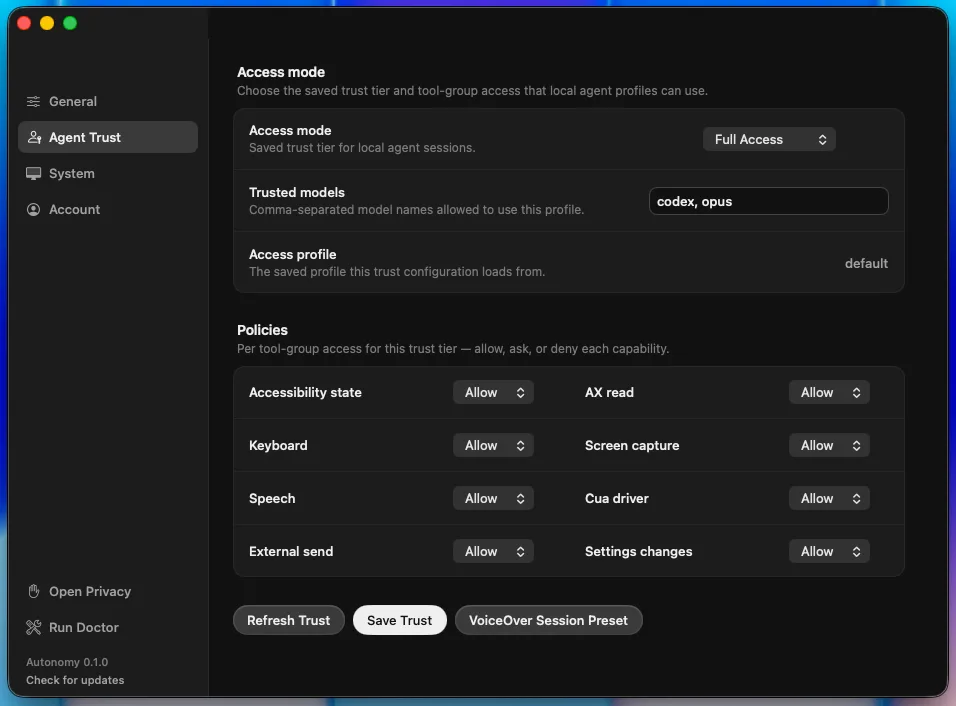
*The Agent Trust screen makes consent concrete: access mode, trusted models, and per-capability policies are visible instead of buried in agent code.*
**Local-first, and the accessibility layer is free.** The runtime is local; evidence is redacted before it goes anywhere. There's an optional Pro subscription for the commercial extras, but as the Account screen itself puts it: "Your local accessibility layer always stays free."
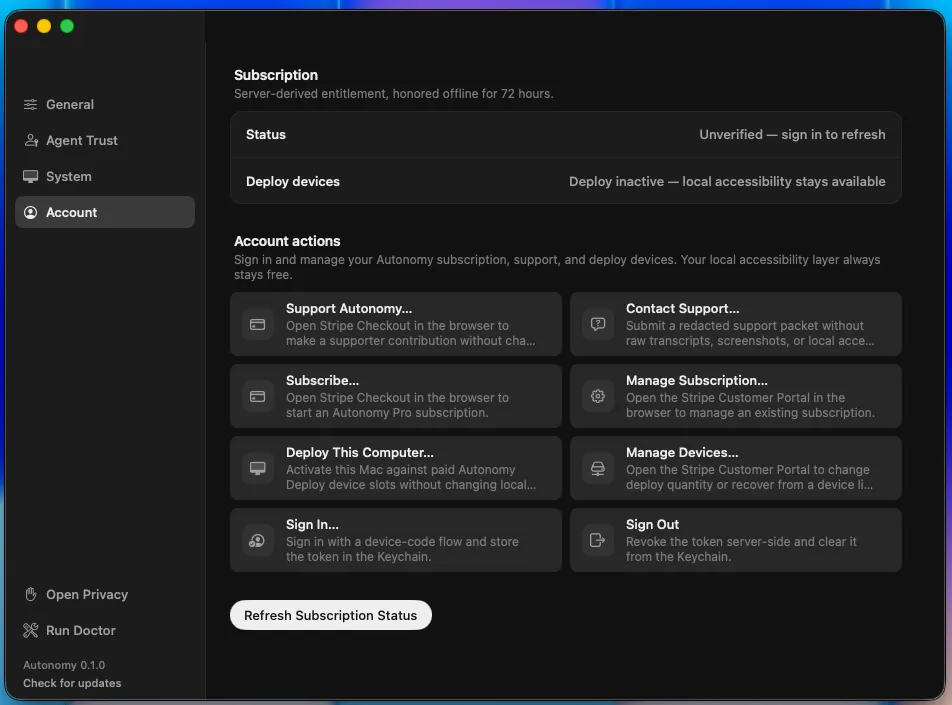
*The account surface separates paid product actions from the local accessibility layer, which stays available even when subscription status is unverified.*
## The alpha, today
As of today, Autonomy is in alpha. What you get right now: the macOS app (dashboard, Settings, a doctor that checks your permission state, safe in-app self-update, device-code sign-in), the local MCP daemon with the full tool surface, and plugin packaging for Claude Code and Codex. The Settings window just got a complete redesign that we think is genuinely pleasant to look at, and more importantly, it holds the accessibility bar we keep talking about; the story of how is most of this post.
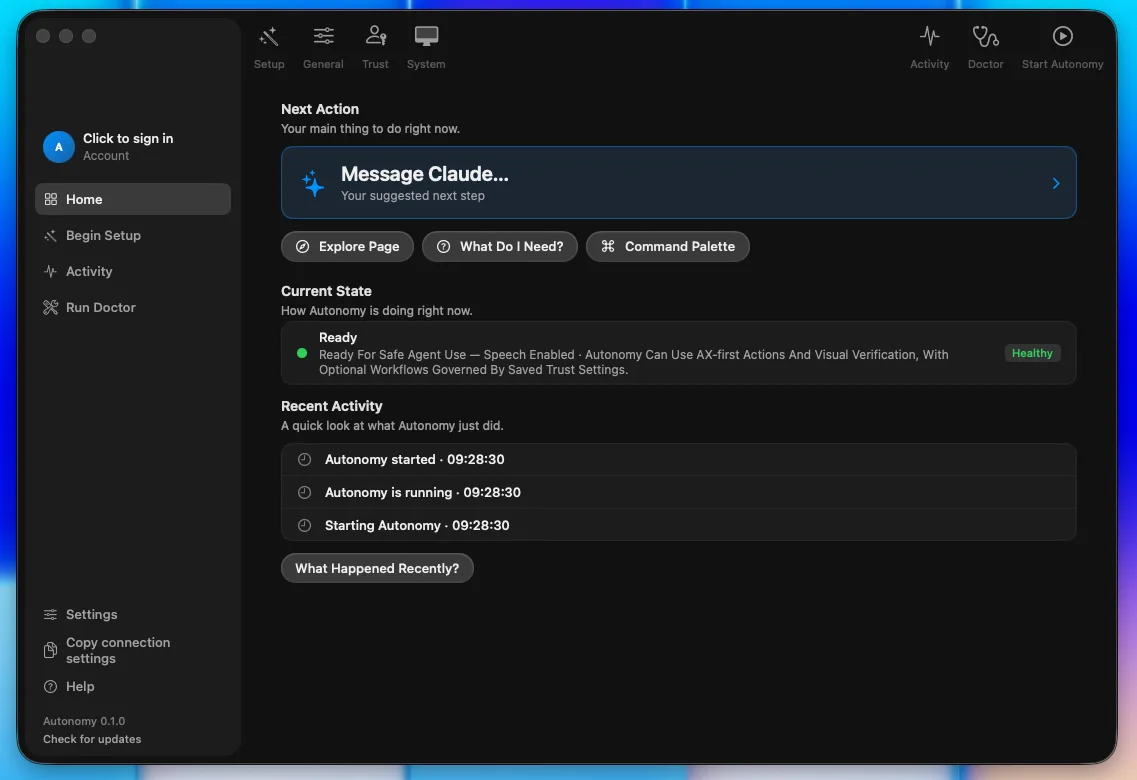
*The alpha dashboard keeps the next action, current assistive state, and recent activity in one screen, with setup and diagnostics reachable from the sidebar.*
Honest alpha caveats, plainly stated. It's macOS only. Setup is currently the weakest part of the product: permissions are scattered, and if you've ever wondered whether Accessibility is granted to the app, the engine, or the helper, so have we; a guided setup wizard is literally in flight as this posts. Some accessibility verification still needs a human pass (a real VoiceOver listen-through of the new Settings, a live Increase Contrast toggle), and we track that debt openly rather than pretending a green test suite equals a good screen-reader experience. The Chrome extension works but doesn't visually match the app yet. You will find rough edges; we'd rather you find them with us.
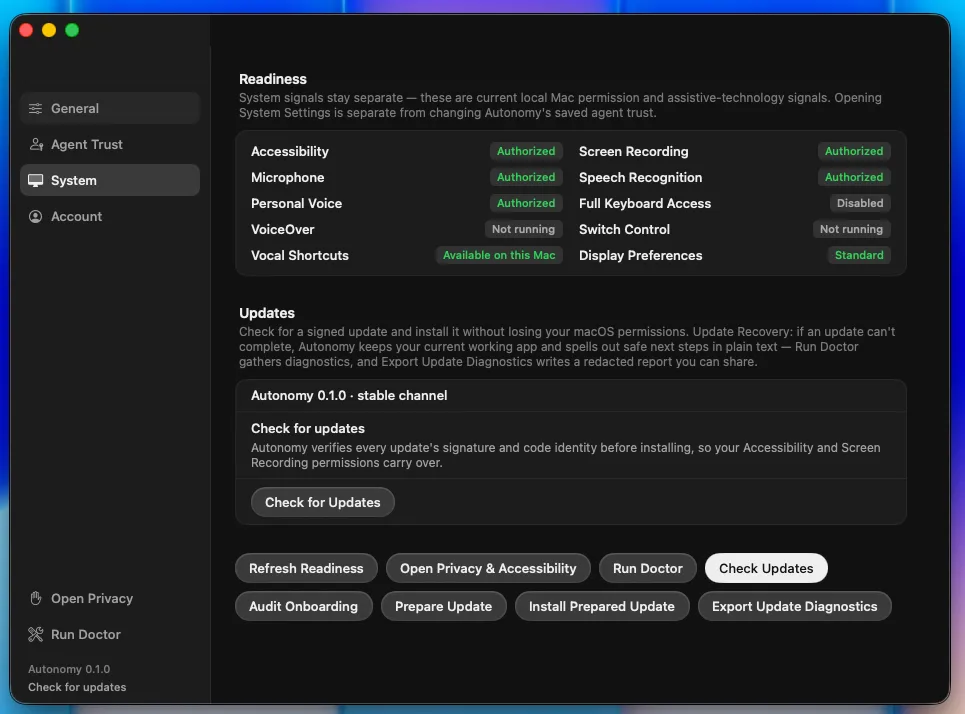
*The System tab shows the messy permission reality directly: authorized services, assistive-technology state, display preferences, and signed update controls live together.*
## How it's built: day 3 with Fable
This is also the third entry in a running series about building Autonomy with Claude Fable 5, Anthropic's new Mythos-class model, as an autonomous engineering partner. Days 1 and 2 covered earlier work. Day 3 covers roughly twenty-four hours, from the evening of July 2 through this morning: twenty commits, one shipped epic, one rejected migration. We're sharing it because for a product whose whole pitch is "agents you can trust with your machine," how we build is evidence, not trivia.
The commit, file, and line counts below are first-party measurements from the local repository and session closeout: Git history for commits, repository line counts for language totals, and before/after line counts for refactored files. The underlying repository and run logs are not linked from this public note, so treat those numbers as a build report rather than an independently reproducible benchmark.
### Evening: the app updates itself through code we just moved
The session opened with a refactor we'd been circling: pulling update coordination out of our app-delegate god object (a class our test harness caps at 1,200 lines, and it lives right at the cap). Fable's own triage note set the tone:
> "NO extraction from this god object is a quick/safe win — every seam is contract-pinned selectors + threaded UI callbacks + coupled properties. The coupling itself is the debt; unwinding each piece is careful, individually-verified work."
"Contract pins," throughout this post, are harness tests that assert exact strings and shapes stay where they belong, so a refactor that silently drifts fails loudly instead. Four methods moved intact into a new 208-line coordinator behind a three-method callback seam; the delegate kept one-line delegators so no wiring changed; the pins followed the move on both sides.
The proof was the fun part. This is the self-update path, and structural tests pin structure, not runtime behavior. So the verification was: make the app update itself through the moved code, live. The update ran end to end, the activity feed logged "Started safe app update 22:34:19" (proving the new callback seam), and the app relaunched from pid 34455 to pid 87088. The close report also honestly listed the three sibling paths that were *not* individually smoked, and why.
### The pivot: Cap envy
Then the plan changed, because the human changed it. I'd been using Cap, a screen-recording app built on Tauri, and I love how it looks. I do not love how stock SwiftUI looks. So I asked the honest question: should Autonomy migrate stacks?
Fable researched instead of guessing. Cap really is zero Swift, and mechanically Autonomy is well positioned for the same move (we're 219k lines of Rust against 27k of Swift). But the accessibility picture is hostile: Tauri has no accessibility program (its tracking issue has been open since 2019), no Dynamic Type bridge, frameless windows that break screen readers, and there is no VoiceOver-first macOS Tauri app anywhere to learn from. The verdict:
> "it moves 100% of the a11y burden from AppKit onto our own ARIA with no upstream owner — direct tension with the a11y north star."
The counter-move was better than the migration. The diagnosis: my objection was the stock-SwiftUI *look*, not the framework. So Fable extracted Cap's actual design tokens from its open-source code, the Radix gray ladder and dark-theme overrides, exact hexes, radii, spacing, type sizes, and took 25 screenshots I'd captured of Cap as composition ground truth. Where source and screenshots disagreed, the screenshots won. The plan: recreate the aesthetic natively, Settings window first.
### Overnight: ten slices while I slept
I approved the spec around 11pm and went to bed. A self-paced loop, an orchestrator dispatching fresh-context executor agents, shipped the entire Settings redesign overnight (epic `autonomy-7vje1`, for the archaeologists): ten slices, each with the same discipline. Prove the red first (the validation markers must fail before implementation, every time), implement, run the full contract-test green gate, reinstall the real app, screenshot it in light and dark, commit with evidence.
The slices: a token ladder, a seven-piece component kit, a SwiftUI shell replacing the old AppKit machinery (the window controller went from 700 to 441 lines), four restyled tabs one at a time, a fit fix, window chrome, and a closing accessibility pass. The pinned settings contract was never modified; every pinned string survived by moving with its pin.
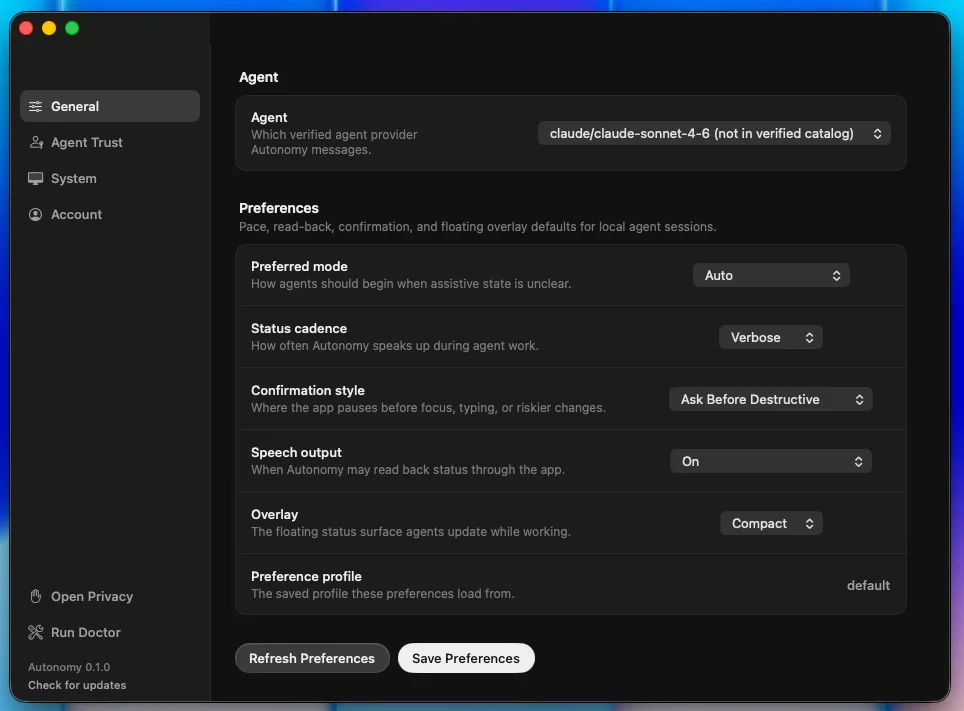
*The General preferences tab after the Settings restyle: agent selection, read-back cadence, confirmations, speech, and overlay defaults.*
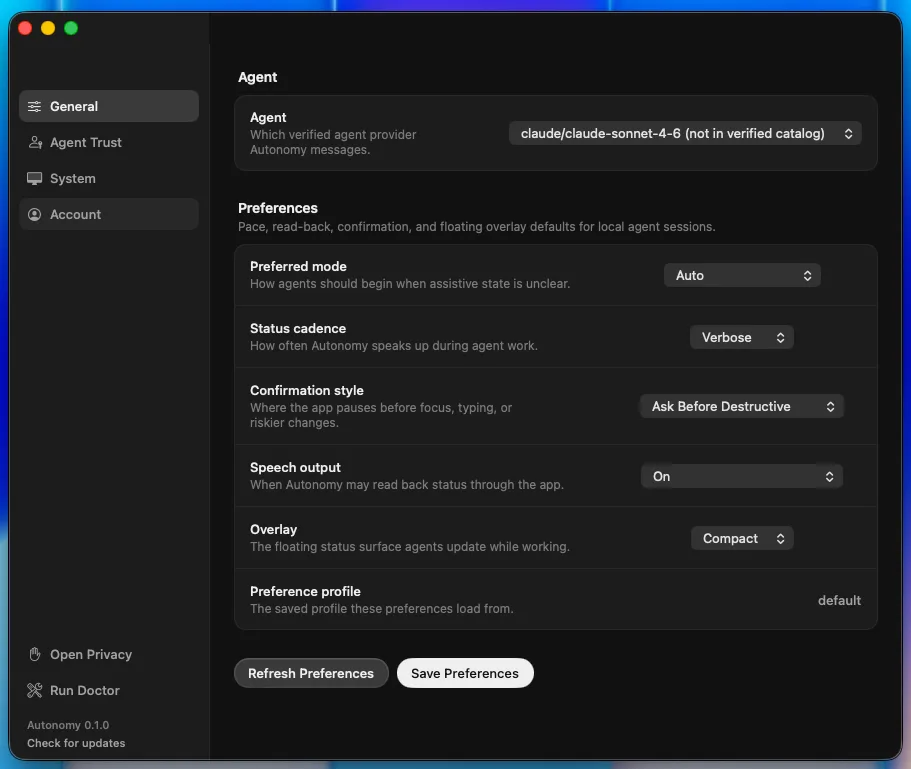
*A narrower restored frame from the same pass, used to check that the sidebar, controls, and save actions still fit cleanly.*
Four moments from the night stand out.
**A fit rule violated, then proven unfittable.** Our no-scrolling rule says every panel fits its window; scrolling exists only as a large-type fallback. The restyled System tab didn't fit; the loop filed the bug against itself mid-flight and fixed it next slice, taking content from 1084pt to 599pt against a 668pt viewport. Then it went further: the old 860x600 minimum window was "proven unfittable (pill widths sum 1202pt)". Arithmetic, not vibes. The minimum was raised per measurement.
**Increase Contrast, implemented at the token layer.** Hairlines step up a level and text tiers brighten; dark-mode tertiary text had been 3.9:1, below the WCAG AA contrast floor, before this. Along the way the loop discovered that AppKit normalizes high-contrast appearance names while the system setting is off, and pinned that finding in the self-test suite so the knowledge can't rot.
**Dynamic Type, closed with citations instead of code.** The spec had assumed scalable typography. The investigation ended in "macOS doesn't have it": Apple's Human Interface Guidelines say so, the API docs say so, and an empirical probe rendered pixel-identical output under forced accessibility sizes. The spec got an addendum and no speculative scaling code was written.
**A test script that could never have worked.** Our accessibility-scenario script pressed buttons by name through AppleScript's System Events, and SwiftUI buttons turn out to be invisible to that enumeration entirely. The fix was a direct accessibility-API helper, verified live from red to green. Lesson now baked into the next spec: accessibility-API verification only.
The pass finished with a keyboard walk across all four tabs (67 stops, no traps), four scroll-free tabs in both appearances, and eight reviewed screenshots. Where automation was blocked, the gate said so honestly and filed the debt instead of papering over it.
### Morning: the next epic, mid-flight
I woke up, reviewed, and we designed the next round interactively: Fable built clickable HTML mockups, I clicked "dashboard-good" and "wizard-good," and that click record is cited in the spec as the approval. Three slices of the dashboard restyle have already landed this morning: a sidebar with an account-and-agent profile row, the dashboard canvas rebuilt on the new kit (which deleted the home screen's last legacy AppKit button), and the Update Ready toolbar pill. The pill's live smoke test is a nice miniature of the safety posture: the loop simulated an available update, verified the pill's accessibility semantics, explicitly did not press it, and restored the simulation byte-identical.
The executors also push back on their own instructions. The sidebar executor found that the plan's own sample code used an accessibility modifier that strips a button's role and press action, cited the Apple documentation, proved it with a live accessibility probe, deviated from the plan, and documented the deviation in the commit. Screenshot dogfooding caught a real window-restore bug the same way (AppKit clamps window resizes to the minimum size, but not restored frames). And when Fable assessed an MIT-licensed app as a source for wizard mechanics, the verdict came with a warning label worth framing: pull three window-management ideas, adopt zero dependencies, and note that its interaction layer has 16 accessibility modifiers in 131K lines of code. Copy the visuals only; rebuild all interaction on our kit.
All of this ran overnight under standing safety rails: no global keystrokes (when I was typing in another window, smoke tests that needed the keyboard were skipped and honestly listed as residual), never press buttons on surfaces the loop doesn't own, and when a stray macOS password dialog appeared mid-run, cancel it, "no password entered."
## What's next
The dashboard epic finishes this week, then the piece we most owe you: a Cap-style setup wizard that turns the scattered permissions mess into one guided flow, including a first-class assistive-profile step (VoiceOver-first, switch and keyboard, low vision) that configures preferences and trust in one pass. After that, real name and email on your profile, and the extension restyle. The human-verification tail from the overnight run happens today, with me awake, including the VoiceOver listen-through. And if the web-UI question ever returns, the documented path is a one-surface spike judged by a blind VoiceOver participant review, not a rewrite on faith.
## Try it
If you use a screen reader, switch access, or keyboard-first control and you want an AI agent that meets you there, you're exactly who this alpha is for. And if you're an agent builder who'd rather not reinvent an accessibility runtime, connect your MCP client and tell us what breaks.
Sign up for the alpha here: [tryautonomy.app](https://tryautonomy.app)
It's an alpha. It will have rough edges. But it updates itself through code that proved itself live, its test suite does arithmetic on pill widths, and its worst accessibility bug last night was found by the machine that wrote the fix. Day 3 was a good day.
## FAQ
### What is Autonomy?
A native macOS app plus a local MCP server that lets AI agents operate your Mac through your real accessibility setup — VoiceOver, keyboard-first control, Switch Control, speech and Personal Voice — with explicit consent and auditable evidence, instead of clicking pixels and hoping. The premise is that disabled users should not have to adapt to agents; agents should adapt to the user's assistive technology, preferences, permissions, and pace.
### Do I have to use a specific agent?
No. Autonomy is not an agent and does not try to be one. Any MCP client — Claude Code, Codex, or anything else — connects to the local Autonomy daemon and drives the conversation through standard tools. A thin Claude launcher ships as the default configuration; the consent-first behavioral rules are delivered as plugins each ecosystem already understands.
### What is in the alpha today, and what are the caveats?
You get the macOS app (dashboard, Settings, a doctor that checks your permission state, safe in-app self-update, device-code sign-in), the local MCP daemon with the full tool surface, and plugin packaging for Claude Code and Codex. Honest caveats — it is macOS only, setup and permissions are still scattered, some accessibility verification still needs a human pass, and the Chrome extension works but does not visually match the app yet.
---
# Steps to Make Accept: text/markdown Work Everywhere
Source: https://appheat.co/posts/accept-text-markdown-cloudflare-workers/
Published: 2026-07-02
Description: I thought I had built Accept-header Markdown for AppHeat. Production had other plans, because Cloudflare was skipping the Worker entirely.
Tags: aeo, seo, ai-search, technical-seo, cloudflare
## Quick answers
- The goal was simple: keep the normal post URL, return HTML to browsers, and return Markdown when a client asks for text/markdown.
- The bug was not my parser at first. Cloudflare was serving prerendered post pages from static assets and never invoking the Worker.
- The routing fix is one field in wrangler.jsonc — assets.run_worker_first, set to ["/posts/*"] — which forces those paths through the Worker instead of the asset server.
- Once the Worker was actually running, an acceptmarkdown.com scorecard (75/100) caught a second issue — a naive substring check that ignored Accept q-values and never returned 406 for unsupported types. Both are fixed now.
I asked an agent to check whether appheat.co answered `Accept: text/markdown` the way [acceptmarkdown.com](https://acceptmarkdown.com) tests for.
It did not.
That bug sounded small enough to be a quick patch: wrap the Cloudflare Worker, read the `Accept` header, return Markdown for post pages, ship it. Instead, I built the obvious version, deployed it, and then spent most of an hour chasing what looked like a cache problem.
It was not a cache problem.
This is the debugging note, including the wrong turns.
## What content negotiation actually means here
Two different things get called "serving Markdown to AI agents," and I had to separate them before the bug made sense:
1. **A separate URL.** `appheat.co/posts/some-slug.md` returns raw Markdown. You link to it with ``. This is easy to build and easy to verify with a plain `curl`.
2. **Content negotiation on the same URL.** `appheat.co/posts/some-slug/` returns HTML by default, and Markdown when the request sends `Accept: text/markdown`. No second URL. This is what acceptmarkdown.com actually tests, and it is the pattern more agent tooling is starting to assume.
AppHeat already had the first one from an earlier pass on the site's [AEO strategy](/posts/aeo-from-the-jump/). `Accept: text/markdown` was the missing piece.
## The straightforward part
The site builds through `@astrojs/cloudflare`, which generates its own Worker entry file at build time (`dist/server/entry.mjs`). I did not want to fork the adapter for one header experiment, so I used a small post-build script that wraps the generated entry with our own `fetch` handler:
```js
// apps/personal-site/scripts/wrap-entry.mjs (trimmed)
const POST_ROUTE = /^\/posts\/([^/]+)\/$/;
export default {
async fetch(request, env, ctx) {
const url = new URL(request.url);
const accept = request.headers.get("Accept") ?? "";
if (accept.includes("text/markdown") && POST_ROUTE.test(url.pathname)) {
const slug = url.pathname.match(POST_ROUTE)[1];
const mdUrl = new URL(request.url);
mdUrl.pathname = `/posts/${slug}.md`;
const mdResponse = await _originalFetch(new Request(mdUrl), env, ctx);
if (mdResponse.ok) {
return new Response(mdResponse.body, {
status: 200,
headers: {
"Content-Type": "text/markdown; charset=utf-8",
"Cache-Control": "public, max-age=3600",
"Vary": "Accept",
},
});
}
}
// Normal HTML path, with Vary: Accept added so caches
// know the response depends on the Accept header.
const response = await _originalFetch(request, env, ctx);
const headers = new Headers(response.headers);
headers.set("Vary", "Accept");
return new Response(response.body, { status: response.status, headers });
},
};
```
The shape was boring on purpose: if the request wants Markdown and matches a post URL, internally re-fetch the existing per-post `.md` route and return that body with the right content type. Otherwise, fall through to the normal HTML response and add `Vary: Accept` so shared caches know the representation depends on the header.
`package.json` runs it after every build:
```jsonc
// apps/personal-site/package.json
"build": "BUILD_TARGET=cloudflare astro build && node scripts/wrap-entry.mjs"
```
I built it, ran the site checks, committed, and deployed.
## Where it fell apart
```bash
curl -s -H "Accept: text/markdown" https://appheat.co/posts/aeo-from-the-jump/ | head -c 200
```
HTML. Every time. Very funny, production.
The obvious suspect was Cloudflare's CDN cache serving a stale copy of the page from before the Worker change. So I did the extremely normal thing where you decide the cache is guilty and keep interrogating it:
- Added `Vary: Accept` to every HTML response, so the CDN would (in theory) cache HTML and Markdown separately.
- Added `CDN-Cache-Control: no-cache` to force edge revalidation on every request.
- Tried cache-busting query strings.
- Tried purging the zone cache directly through the Cloudflare API.
None of it changed the result. Still HTML, every time, `cf-cache-status: HIT`.
The clue was sitting in a request I had already made and half-ignored: a request to a **path that did not exist** — a 404 — correctly returned the negotiation headers (`Vary: Accept`, plus a debug header I had added). A request to a **real post URL**, even with a random query string appended, never did.
Those two results only make sense one way: the Worker was running for the 404, and never running for the real post page.
## The actual cause
`wrangler.json` for this site includes an `assets` binding — the mechanism Cloudflare uses to serve prerendered static files (our post pages are static HTML, built ahead of time by Astro) directly from the edge:
```json
"assets": { "binding": "ASSETS", "directory": "../client" }
```
By default, when a request's path matches a file that exists in that assets directory, Cloudflare serves it **directly from the edge asset store and never invokes the Worker script at all**. That is a feature, not a bug. Static content should not pay for a Worker invocation it does not need. But it also means any custom logic living in the Worker's `fetch` handler, including this content-negotiation wrapper, simply never runs for those paths.
The post pages are exactly that kind of file: static HTML built at compile time. So every request to `/posts/aeo-from-the-jump/` was served straight from the asset store, before `wrap-entry.mjs` ever got a chance to look at the `Accept` header. The Vary header, the cache-busting, the cache purge — none of it could have worked, because the code that would have set those headers was not in the request path.
The fix is one field, in the source `wrangler.jsonc`:
```jsonc
// apps/personal-site/wrangler.jsonc
{
// ...
"assets": { "run_worker_first": ["/posts/*"] }
}
```
`run_worker_first` tells Cloudflare to route matching paths to the Worker script first, instead of straight to the asset store. I scoped it to `/posts/*` instead of setting it to `true` globally, because images, JS chunks, `_astro/*`, and the rest of the static stuff should still stay boring and fast. Only post routes need the extra Worker hop.
## Verifying it for real this time
Locally, with `wrangler dev`:
```bash
curl -s -D - -o /dev/null http://localhost:8787/posts/aeo-from-the-jump/
# HTTP/1.1 200 OK
# Content-Type: text/html; charset=utf-8
# Vary: Accept
curl -s -D - -o /dev/null -H "Accept: text/markdown" http://localhost:8787/posts/aeo-from-the-jump/
# HTTP/1.1 200 OK
# Content-Type: text/markdown; charset=utf-8
# Vary: Accept
```
And in production, after deploying:
```bash
curl -s -H "Accept: text/markdown" https://appheat.co/posts/aeo-from-the-jump/ | head -3
# ---
# title: "AEO from the jump: build pages people can quote"
# description: "A practical note on making pages easy to read, cite, and hard to misquote."
```
Same URL, no query string, no cache-busting. A plain request gets HTML. An `Accept: text/markdown` request gets the post's frontmatter and body as Markdown. That was the acceptmarkdown.com pattern, finally working.
## The scorecard caught the shortcut
"Working" was also optimistic. Running the actual [acceptmarkdown.com](https://acceptmarkdown.com) readiness check against the live post put a number on the shortcut I had left in the implementation.
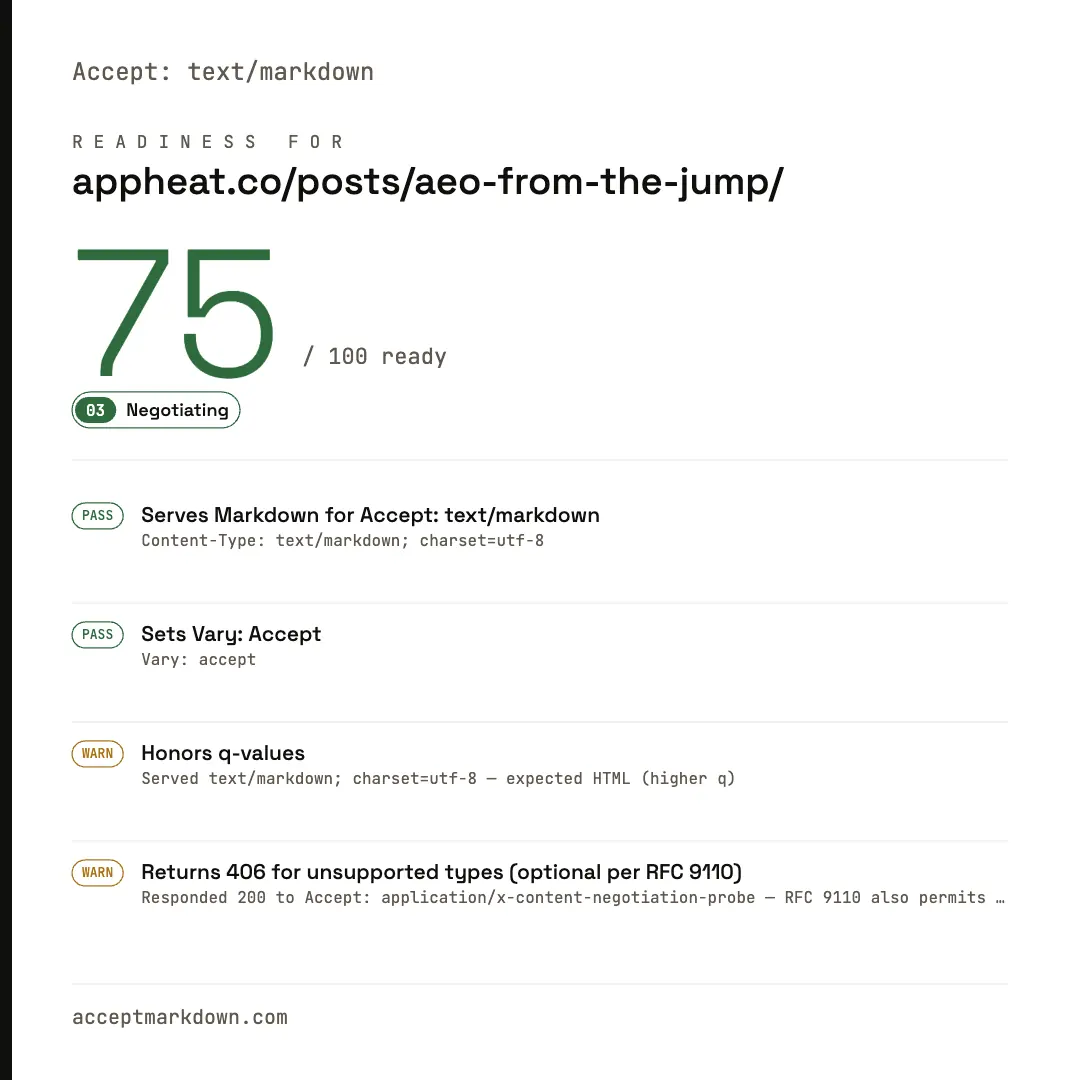
75/100. Two real passes, two real warnings:
- **Honors q-values** — the check sent an `Accept` header where `text/html` had a higher quality value than `text/markdown`, meaning the client actually preferred HTML. The response came back as Markdown anyway.
- **Returns 406 for unsupported types** — the check sent an `Accept` value the server has no representation for at all. The response came back `200` with HTML instead of `406 Not Acceptable`.
Both pointed at the same smaller mistake: the negotiation logic was `accept.includes("text/markdown")`, a substring check with no concept of preference or unsupported media types. It answered "does the word markdown appear in this header?" instead of "what representation does the client actually prefer?"
### Fixing q-values
[RFC 9110 §12.5.1](https://www.rfc-editor.org/rfc/rfc9110.html#section-12.5.1) defines `Accept` as a weighted list — each media range can carry a `q` parameter from 0 to 1, and the highest `q` wins. `Accept: text/html;q=0.9, text/markdown;q=0.5` is a client saying "I can take Markdown, but I'd rather have HTML." My first version never looked at `q` at all.
The fix parses the header properly and compares weights:
```js
// apps/personal-site/scripts/wrap-entry.mjs (trimmed)
function parseAccept(header) {
return header
.split(",")
.map((part) => {
const pieces = part.trim().split(";").map((p) => p.trim());
const type = pieces[0].toLowerCase();
let q = 1;
for (const param of pieces.slice(1)) {
const match = param.match(/^q=([0-9.]+)$/i);
if (match) q = parseFloat(match[1]);
}
return { type, q };
})
.filter((entry) => entry.type && !Number.isNaN(entry.q));
}
function qFor(parsed, mediaType) {
const [type] = mediaType.split("/");
let best = -1;
for (const entry of parsed) {
if (entry.type === mediaType || entry.type === `${type}/*` || entry.type === "*/*") {
if (entry.q > best) best = entry.q;
}
}
return best;
}
const markdownQ = qFor(parsed, "text/markdown");
const htmlQ = qFor(parsed, "text/html");
const wantsMarkdown = parsed.length > 0 && markdownQ > 0 && markdownQ >= htmlQ;
```
Markdown only wins when its `q` is present, greater than zero, and at least as high as HTML's. `text/html;q=0.9, text/markdown;q=0.5` now serves HTML, which is what the client asked for.
### Adding the 406
RFC 9110 says returning `406 Not Acceptable` when nothing on the server matches the client's `Accept` header is optional — a server can also send its default representation. But in this case "optional and more correct" was still more correct, so if neither `text/markdown`, `text/html`, nor a wildcard is acceptable, the Worker now says so explicitly instead of silently defaulting to HTML:
```js
const nothingAcceptable = parsed.length > 0 && markdownQ <= 0 && htmlQ <= 0;
if (nothingAcceptable) {
return new Response("Not Acceptable", {
status: 406,
headers: {
"Content-Type": "text/plain; charset=utf-8",
"Vary": "Accept",
},
});
}
```
The `parsed.length > 0` guard matters: a request with no `Accept` header at all, or a bare `Accept: */*`, should still get HTML — only an explicit, non-matching `Accept` value triggers the 406.
### Verifying both fixes
```bash
# HTML preferred over Markdown via q-values — should be HTML
curl -s -D - -o /dev/null \
-H "Accept: text/html;q=0.9, text/markdown;q=0.5" \
https://appheat.co/posts/aeo-from-the-jump/
# content-type: text/html
# Markdown preferred over HTML via q-values — should be Markdown
curl -s -D - -o /dev/null \
-H "Accept: text/html;q=0.5, text/markdown;q=0.9" \
https://appheat.co/posts/aeo-from-the-jump/
# content-type: text/markdown; charset=utf-8
# Unsupported type — should be 406
curl -s -D - -o /dev/null \
-H "Accept: application/x-content-negotiation-probe" \
https://appheat.co/posts/aeo-from-the-jump/
# HTTP/2 406
# content-type: text/plain; charset=utf-8
# No Accept header at all — should still be HTML, not 406
curl -s -D - -o /dev/null https://appheat.co/posts/aeo-from-the-jump/
# content-type: text/html
```
All four came back as expected against the live site. That is the same shape of check the scorecard runs; I did not re-run acceptmarkdown.com just to get a cleaner screenshot, because the direct `curl` checks against production are the evidence I trust more.
## What I'd reuse
If you are deploying an Astro site, or any static-plus-Worker site on Cloudflare, and you need request-time logic — content negotiation, A/B routing, geo-based responses, anything that reads a header before deciding what to return — check whether the paths you care about are prerendered static files. If they are, and you are using the `assets` binding, your Worker code will not run on them by default. `run_worker_first` is the setting that changes that, and it takes either `true` or an array of route globs so you can scope the cost to only the paths that need it.
The debugging shortcut worth keeping: if a header or cache setting you added is not showing up, do not start with "the cache is stale." First prove the code that sets the header is executing at all. A request to a path that cannot be a built static asset — a 404, a random path — will tell you whether your Worker is even in the request path.
Once the Worker was actually in the request path, "it returns Markdown when asked" was still not the same as "it implements content negotiation correctly." A real Accept header parser — one that reads `q` values and knows the difference between "no match" and "wildcard match" — is a small amount of code. Writing `accept.includes("text/markdown")` and calling it done was the shortcut that produced two more smaller bugs.
## Caveats
This makes appheat.co negotiable by `Accept: text/markdown` for post pages specifically. It does not guarantee any particular AI agent or tool sends that header, and it does not replace the bulk `llms-full.txt` endpoint or the discoverable per-post `.md` URLs already on the site. Those are still useful for tools that prefer an explicit URL over content negotiation. This is one more path into the same content, for the tools that use it.
The scorecard image in this post reflects the site's state before the q-value and 406 fixes. It is the evidence that motivated the follow-up, not a claim about the current score. I verified the fix by replicating the checks with `curl` against production, not by re-running acceptmarkdown.com for a prettier number.
## Commands used
```bash
# Local verification
pnpm appheat:build
pnpm -C apps/personal-site exec wrangler dev --port 8787
# Production verification, after the routing fix
curl -s -H "Accept: text/markdown" https://appheat.co/posts/aeo-from-the-jump/
# Production verification, after the q-value and 406 fix
curl -s -D - -o /dev/null -H "Accept: text/html;q=0.9, text/markdown;q=0.5" https://appheat.co/posts/aeo-from-the-jump/
curl -s -D - -o /dev/null -H "Accept: application/x-content-negotiation-probe" https://appheat.co/posts/aeo-from-the-jump/
```
## Disclosure
Drafted with AI assistance from the actual debugging session, then edited around the real lesson. The header behavior and terminal output shown were captured on 2026-07-01 against a local `wrangler dev` instance and the live appheat.co production deployment. The acceptmarkdown.com scorecard screenshot was captured by the site owner in a browser, not generated by the AI assistant.
## FAQ
### What is Accept-header content negotiation for Markdown?
The client sends a normal request to a page URL with an Accept header of text/markdown. The server returns the same content as Markdown instead of HTML, at the exact same URL a browser would use. No separate .md URL is required for this to count, though we kept one too.
### Why did Vary and Cache-Control headers not fix it?
Because the Worker code that set those headers never executed. Cloudflare's static-assets binding serves a matching prerendered file straight from the edge before the Worker's fetch handler runs, unless assets.run_worker_first tells it not to.
### How do you know the Worker was being skipped, and not just cached?
A request to a path with no matching static file (a 404) correctly returned the negotiation headers. The same request to a real, existing post URL never did, even with a cache-busting query string. Only one explanation fits both results.
### Does this slow down every request?
No, if you scope run_worker_first to the routes that need it. We set it to ["/posts/*"] so every other static asset (images, CSS, JS chunks) still serves directly from the edge, and only post pages pay the extra Worker hop.
### What did the acceptmarkdown.com scorecard actually catch?
Two RFC 9110 gaps in the negotiation logic. It ignored Accept q-values, so a client that preferred HTML over Markdown (a higher q-value on text/html) still got Markdown back. And it never returned 406 Not Acceptable for an Accept value the server has no representation for, defaulting to HTML instead.
### Is returning 406 for unsupported Accept types required?
No. RFC 9110 section 12.5.1 makes it optional — a server may send its default representation instead. It is the more correct response when nothing matches, so the Worker now does it explicitly rather than silently defaulting to HTML.
---
# I Built an AEO Agent Workflow. Google Made Me a Skeptic.
Source: https://appheat.co/posts/i-built-an-aeo-agent-workflow/
Published: 2026-07-02
Description: A field note from setting up a local Pi workflow with OpenRouter agents to research AEO topical authority. The real surprise was not any agent tactic — it was what Google's own guidance actually says.
Tags: aeo, agents, ai-workflows, seo, building-in-public, content-strategy
## Quick answers
- AEO is not a separate discipline. Google's own guidance roots AI Overviews and AI Mode in the same core Search systems that handle regular results.
- The most useful outcome of an AEO agent workflow was not a checklist of tactics. It was a pressure-tested publishing philosophy: make content more original, crawlable, source-backed, and citable.
- The agent system earned its keep as a reviewer and pressure tester. It also created giant context handoffs and overconfident research until verifier agents pushed back.
I wanted to build an AEO agent workflow that would help AppHeat grow topical authority around [answer engine optimization](/topics/answer-engine-optimization/).
I ended up more skeptical of AEO as a separate discipline, and more convinced that the real work is the same work that has always mattered.
This is the field note from that build.
Scope note: this is a first-person build note, not a universal AEO study. I verified the Google Search guidance most deeply here; OpenAI, Perplexity, Anthropic, and other retrieval products deserve their own pass before I make broad claims about all AI search.
## The hypothesis
The idea was straightforward.
If AI search tools are pulling sources from crawlable, indexable pages, then a site that wants to show up in those answers should be:
- Crawlable and well-linked, so the bot can find everything
- Source-backed and citable, so nothing looks made up
- Organized by topic hub, not just reverse-chronological feed
- Schema-parity checked, so the structured data matches what is visible on the page
- Visible-answer-first, so the machine and the reader get the same point
I wanted a deterministic local agent workflow that would research, verify, and pressure-test content against those standards. Not a one-shot prompt. A repeatable editorial loop with clear roles, source checks, and enough structure that I could trust the shape of the output without pretending the model itself was deterministic.
I set up a local Pi workflow with OpenRouter models and gave the agents distinct jobs. I am intentionally not turning this into a full recipe, because some of the orchestration details may become product work later. The public part is the lesson: the workflow was most useful when it separated planning, source gathering, verification, and synthesis instead of asking one model to do everything.
The first real run was an `appheat-research-brief` workflow: research AEO topical authority from primary sources, identify what search platforms actually recommend, flag the vendor claims that do not hold up, and produce a durable brief for content planning.
## The build
The workflow config was deterministic enough to be inspectable: declared phases, role boundaries, timeouts, and output schemas. The runner executed locally. The model calls were still nondeterministic, but the outer system gave me a way to see where a run failed and which role produced which claim.
The research pass asked a narrow question: what do the primary sources actually say about AI Overviews, AI Mode, structured data, crawlability, `llms.txt`, and content formatting for AI systems? The important constraint was source quality. Platform docs counted differently from agency posts, tool-vendor claims, and third-party studies.
The gathering step split web research from local-site review. That mattered because the public question and the site-quality question are related, but not the same.
The verification step was the most important part. Its job was to reject weak metrics, flag unsourced claims, and distinguish platform guidance from third-party analysis.
The synthesis phase assembled the verified research into a durable brief artifact with content angles, source limits, and operational notes.
## The failures
The first live run timed out at 90 seconds.
The research planner hit the wall before the scouts even started. The prompt was detailed, the model reasoning was thorough, but the timeout was set for a quick pipeline that did not account for how many tokens the planner would burn through before handing off.
I raised the research workflow timeout to 240 seconds and ran it again.
This time the full run completed: 6 agent calls, approximately 569,000 tokens, roughly $0.10 total (estimate, not measured billing data). Four agents finished. One web scout consumed 274,000 tokens and finished. Another consumed 155,000 tokens and finished. The source verifier and synthesis writer both completed.
The call and token counts came from the local workflow's run summary. The underlying logs are not public; the dollar figure is an estimate from configured model rates, not measured billing data or a general cost benchmark.
The local scout still timed out.
The context handoff was too large. The local scout received the full planner JSON output instead of a compact summary, and the model spun for 240 seconds without producing a result. The agent did not fail cleanly. It just disappeared at the timeout boundary.
Two takeaways from the failures:
First, agent context handoffs are a real design surface. Sending the full planner output to every downstream agent burns tokens, hits timeout walls, and produces inconsistent results. The next iteration needs compact plan summaries, not full JSON dumps.
Second, role separation matters, but it does not solve the handoff problem by itself. A fast agent does not help if the prompt is already bigger than the useful work it needs to do.
## The research surprise
I expected the research workflow to surface AEO tactics. Structured data tricks. Content formatting patterns. Entity-density ratios. Maybe something about prompt-visible summaries.
What I got instead was Google's own guidance making most of those ideas look unnecessary.
Google Search Central has a dedicated page on [AI features and your website](https://developers.google.com/search/docs/appearance/ai-features). The practical reading is blunt: AI Overviews and AI Mode still lean on Google's core Search systems, and eligible pages need the normal Search basics rather than a separate AEO checklist.
That page says AI feature eligibility depends on being indexed, snippet-eligible, and compliant with Search requirements. It also says existing SEO fundamentals still matter: crawl access, internal links, page experience, textual content, useful media, and structured data that matches visible page content.
Separately, Google's [guide to optimizing for generative AI features](https://developers.google.com/search/docs/fundamentals/ai-optimization-guide) says Google Search does not use `llms.txt` as a special visibility or ranking input. This is a direct answer to the growing vendor narrative that `llms.txt` is an AEO signal.
The same guide pushes back on other fashionable tactics. It says chunking content into tiny pieces is not required, rewriting for AI systems is not needed, and special schema is not required for generative AI search. Structured data can still be useful for normal Search features and machine understanding, but it is not a citation shortcut.
The vendor AEO narrative — special markup, AI-only content formatting, `llms.txt` as a ranking signal, entity optimization as a new discipline — does not come from Google. It comes from SEO tool companies and agencies building products around a perceived new market.
That does not mean AI search is irrelevant. It means the useful advice is not new advice.
## The new philosophy
The workflow pushed me back toward craft.
The useful AEO insight was not a tactic. It was a publishing philosophy that holds up under scrutiny:
**Write first-hand build notes.** An AI system pulling from sources cannot distinguish between a surface-level summary and a field note from someone who actually built the thing. But a search quality system can measure originality, and a reader can tell the difference. Build in public. Write what you learned, not what you think a machine wants.
**Cite primary sources.** Do not cite someone else's roundup. Find the actual guidance from the platform. Link to the documentation page. This makes the content useful to people and harder for search quality systems to dismiss as derivative.
**Keep visible answer summaries honest.** If the page makes a claim, the claim should be visible, specific, and verifiable. The same structure that helps a reader decide whether the page is worth their time also helps a search system decide whether the page is a credible source.
**Make topic hubs crawlable.** A reverse-chronological feed is useful for people who follow along. It is not useful for a machine trying to understand what topics a site covers. Topic hub pages that link to the strongest posts in each cluster serve both audiences.
**Use schema only when it matches visible content.** Schema is documentation for machines. If the structured data describes something that is not visible on the page, the mismatch creates trust problems for both search systems and readers. Schema parity — making sure the markup reflects what is actually on the page — matters more than adding more markup.
None of these are AEO-specific. They are SEO fundamentals that predate AI search by years. The difference is that AI search systems, by pulling directly from page content rather than from a link graph, make content quality and source backing more directly observable.
## What the agent workflow is actually good for
The workflow earns its keep, but not as a hack generator.
As a reviewer, it catches claims that lack source backing. The verification step rejected specific multipliers, overly precise metrics, and vendor citations that could not be traced to platform documentation.
As a pressure tester, it surfaces structural weaknesses in content organization. The local scout's job was to audit crawl topology and schema parity, and even though it timed out, the question it was supposed to answer — does the site's structure hold up when a bot tries to map it? — is the right question.
As a source tracker, it maintains a record of what primary sources were consulted, what was rejected, and why. The durable brief artifact includes source limits, operational notes, and a labeled distinction between platform guidance and third-party analysis.
What it does not do is guarantee AI citations, generate magic markup, or replace the writing. The workflow is a pressure-testing layer, not a content factory.
## The limits
The workflow has real limits, and I should name them.
**Cost and token efficiency.** Six agent calls at 569,000 tokens is not the budget breaker it sounds like on a per-run basis. But scaling to frequent content review runs would require prompt compaction, shorter handoffs, and smarter routing. The current design still burns too many tokens on planning and handoff steps.
**Timeout fragility.** A single oversized context handoff can kill a downstream agent silently. The local scout timed out without producing a result or a clean error, and the workflow ran as "completed" because the other agents finished. This is not a correctness guarantee. It is a survivorship report.
**Overconfidence risk.** Without a verification agent that explicitly rejects weak metrics, the synthesis writer would have included vendor-sourced multipliers and entity-density claims that do not hold up to platform documentation. The verifier is not optional. It is the safety layer.
**Vendor platform coverage.** This run focused on Google Search Central as the strongest primary source. OpenAI, Perplexity, and Anthropic publisher guidance was not verified at the same depth. A future run should expand scope, but the core finding — that the platform whose AI search product has the broadest reach says AEO is just good SEO — is not fragile.
## Next experiments
This is not the end of the AEO investigation. It is a baseline, and the baseline is skeptical.
The next experiments I want to run:
**Compact handoff architecture.** Shorten downstream prompts and separate local-site audit from web research so one oversized context handoff does not distort the whole run.
**Multi-platform verification.** Run the same research workflow against OpenAI, Perplexity, and Anthropic publisher guidance at the same depth. The question is whether any platform contradicts Google's position, or whether the answer is the same everywhere: good pages, crawlable structure, source-backed claims.
**Drift monitoring.** After publishing a post, check the rendered page against the claims the workflow thinks are visible. Catch schema drift, broken internal links, and missing answer summaries before they become invisible problems.
**Real ingestion measurement.** Track bot crawl patterns, AI referral traffic where detectable, and source-citation appearances in AI search responses. Even partial signals would be more useful than third-party citation-rate studies with opaque methodology.
## What I would tell another builder
If you are building a site and wondering whether AEO is a separate thing you need to learn, here is the short answer: it is not.
Google's AI Overviews and AI Mode run on the same Search systems that rank your pages now. The platform whose AI search product reaches the most people says there are no special AEO requirements beyond being indexed and eligible for snippets. Schema helps machines understand your page, but it does not guarantee citations. `llms.txt` is not a Google signal. Rewriting content for AI systems is not recommended.
The thing that actually moves the needle is writing first-hand build notes, citing primary sources, making topic hubs crawlable, keeping visible answers honest, and checking that your schema matches what is on the page. That is the thread I started in [AEO from the jump](/posts/aeo-from-the-jump/), and this workflow made me trust it more.
It is also why the next infrastructure question was not "how do I add more AI-only markup?" but "can agents fetch the same page as Markdown when they ask for it?" That turned into the [Accept: text/markdown Cloudflare Workers debugging note](/posts/accept-text-markdown-cloudflare-workers/).
An agent workflow can help with that. It can verify sources, pressure-test claims, and catch drift. But the workflow is a reviewer, not a shortcut. The craft is still the craft.
That is not the conclusion I expected when I started building the workflow. It is the conclusion the workflow pushed me toward by running the research, surfacing the primary sources, and letting the verifier kill the claims that did not hold up.
The agent did its job. It just did not give me the answer I wanted.
## FAQ
### Is AEO a separate discipline from SEO?
No. Google's AI Overviews and AI Mode docs say they are rooted in core Search systems and have no additional technical requirements beyond standard indexability and snippet eligibility.
### Does Google use llms.txt?
No. Google's Search Central guidance explicitly says llms.txt is not used by Google Search.
### Does schema guarantee AI citations?
No. Schema helps machines understand the page, but citations depend on usefulness, authority, clarity, crawlability, and how each search tool retrieves sources. Treat schema as documentation for machines, not a citation shortcut.
### Should I rewrite content specifically for AI systems?
Google says no. The guidance is to write for people, make content original and source-backed, and let AI systems discover it through standard crawlable, indexable pages.
### What is the agent workflow actually useful for?
The workflow is useful as a reviewer, pressure tester, and source-verification layer. It pushes you toward craft: write first-hand build notes, cite primary sources, keep visible answer summaries honest, and make topic hubs crawlable.
### What did the workflow cost to run?
The live research workflow completed 6 agent calls totaling approximately 569,000 tokens at roughly $0.10 (estimate, not measured billing data). One local scout agent still timed out due to oversized context handoff.
---
# What I got done with Fable that kept slipping before
Source: https://appheat.co/posts/what-i-got-done-with-fable/
Published: 2026-07-02
Description: A field note on handing a large Rust refactor to Fable: knowledge-graph analysis, a full graph rebuild that survived a mid-run failure, and a 9,859-line file cut to 877 across six verified commits.
Tags: coding-agents, developer-workflow, refactoring
## Quick answers
- Fable held one coherent thread across a multi-hour task — graph analysis, a full rebuild, and a verified refactor — without losing context.
- The refactor cut a 9,859-line source file to 877 lines across eight cohesive modules in six commits, each with the full test suite green and no public API change.
- It stayed honest under failure — it recovered corrupted sub-agent output and reported the exact coverage gap instead of hiding it.
- It pushed back on my framing and revised its own analysis when the evidence changed, which is the part I could never get reliably before.
I keep a running list of jobs I do not hand to coding agents. Anything that runs longer than a few minutes, touches a lot of files, or needs an actual judgment call usually lands on it. The agents I had been using were great at the small stuff and unreliable at everything else. They would lose the thread, quietly hand back a green checkmark that was not real, or agree with whatever I had just suggested.
I spent an afternoon giving Fable the worst item on that list: the architecture of a large Rust codebase, and one source file in it that had grown to almost ten thousand lines. Here is what actually happened, because the specifics are the point.
## Evidence note
The counts in this post are first-party measurements from the local session: `git log` and changed-file summaries for commit activity, manifest hashes for graph staleness, and before/after line counts plus reconstruction and test outputs for the refactor. The source repository and raw run logs are not public, so these figures are a build report, not an independently reproducible benchmark.
## It reasoned over the graph, not just the files
I had already built a knowledge graph of the codebase and loaded it into Neo4j. Most agents ignore that and start reading files one at a time. Fable queried the graph. It pulled the most-connected nodes, measured how tangled the modules were, and ran queries to separate real code dependencies from noise. It treated my architecture as data instead of scrolling through it.
## It measured staleness instead of guessing
The graph was five days old. A weaker agent either trusts a stale analysis or wastes an hour rebuilding everything from scratch. Fable re-hashed every file against the old manifest, cross-referenced git history — 117 commits, 184 files changed — and told me precisely how stale it was: 38 percent of the relevant files had changed, and it named the hot spots. Then it did the smaller thing: an incremental update, not a full rebuild.
## It fanned out, and stayed honest when it broke
Rebuilding the full graph meant extracting about 1,500 files across the whole project, so Fable dispatched dozens of parallel sub-agents. Partway through, it hit a session limit and several of those workers died mid-write, leaving corrupted, half-finished output.
This is the exact moment most agents either fall over or silently move on. Fable wrote a parser to recover the intact data from the truncated files, pulled back hundreds of nodes that would otherwise have been lost, and then told me plainly what it could not recover and why it did not change the finding. It kept an honest ledger of its own coverage. I did not have to catch it cutting a corner, because it flagged the corner itself.
## It corrected its own conclusion
Its first pass surfaced something alarming: more than 2,300 dependencies crossing a boundary that was supposed to be clean. Instead of running with the scary headline, it dug in, separated documentation references from actual code calls, and found the real number was about 60. It revised itself out loud, and the corrected version was the good news. An agent that will walk back its own analysis when the evidence says so is worth ten that sound certain and are wrong.
## It disagreed with me
I suggested a direction. Fable pushed back. It walked me through why I already had what I was asking for where it counted, pointed at my own written architecture decisions, and explained that the real problem lived somewhere else. It did not flatter me into a pointless restructure. That one honest "no, and here is why" saved me weeks.
## Then it did the work, and proved every step
The centerpiece was a single 9,859-line file, the kind of thing you keep meaning to break up and never do. Fable took it to 877 lines across eight clean modules. A 91 percent cut to the worst file in the codebase.
What sold me was how. No big risky rewrite. It went one slice at a time, six commits, each independently verified with the full test suite green — every run — and zero public API changes. For the trickiest split, where the code clusters were interleaved through the file, it wrote a byte-for-byte reconstruction check across all 119 items before it touched anything, to guarantee nothing was lost or duplicated. It caught its own off-by-one mistakes mid-flight and fixed them. It tracked the work in my issue tracker and committed each verified step. It never once handed me a "done" I had to re-check.
## What was actually different
None of these are party tricks on their own. Added up, they are the thing I could not get before: an agent that stays coherent across hours of genuinely hard work, tells the truth about what it did and did not do, argues when I am wrong, and refuses to claim a result it has not verified.
That is not a faster autocomplete. It is something I can hand the scary work to and still trust the report at the end. I got more durable work done in one afternoon than in weeks of babysitting other tools, which is the whole reason I am still using it.
## FAQ
### What was the hardest thing it did?
It split a single 9,859-line source file into eight cohesive modules, one verified commit at a time, without changing the public API. The trickiest split had interleaved code, so it wrote a byte-for-byte reconstruction check across all 119 items before touching anything.
### Did anything go wrong during the run?
Yes. It hit a session limit mid-run and several parallel sub-agents died with half-written, corrupted output. Instead of crashing or pretending, it salvaged the intact data, recovered hundreds of nodes, and told me exactly what it could not recover and why it did not change the conclusion.
### Is any of this specific to one codebase?
The codebase was Rust, but the pattern is not language-specific — reason over a knowledge graph, separate real dependencies from noise, verify every step against tests, and keep an honest ledger of coverage.
---
# AEO from the jump: build pages people can quote
Source: https://appheat.co/posts/aeo-from-the-jump/
Published: 2026-06-29
Description: A practical note on making pages easy to read, cite, and hard to misquote.
Tags: aeo, seo, ai-search, content-strategy, technical-seo
## Quick answers
- AEO works better when it is part of how pages are written and organized from the start.
- The reusable pattern is simple: make important pages clear, connected, and easy to verify after they render.
- Courses and graders can help with calibration, but they do not replace writing pages that people can actually understand.
I have been thinking about AEO less like a new trick and more like a basic writing problem.
A good page is easy to find and hard to misquote.
That is the goal: clear writing instead of magic markup or a prompt hidden in the page.
You still do not control whether an AI search product cites you. But you can control whether the page makes sense when something tries to summarize it.
## Start before the archive gets messy
The easiest time to care about this is before a site has hundreds of posts.
A reverse-chronological feed is fine for people who already follow along. It is not great for a new reader trying to understand what the site is, what the strongest ideas are, or where to go next.
The same is true for machines. A crawler or AI search tool does not have your mental map. It sees pages, links, headings, summaries, and whatever structured data you give it. If those pieces disagree, the page gets harder to trust.
So the first move is not fancy. Make the site explain itself.
That usually means:
- a homepage that says what the thing is
- a few clear ways in
- topic pages that group recurring ideas
- posts that say the answer before making the reader dig
- search that can find the words people actually use
- metadata that matches what is visible on the page
- a check that catches drift after the site builds
That last part matters more than I expected. The source file is not what readers, crawlers, or AI tools see. The rendered page is.
## The pattern
The useful pattern was to make the important pages clear, connected to nearby writing, and checked after the build. This is where AEO overlaps with normal good publishing. The page should work for the human first. If the page only works because hidden metadata says the right thing, something is off.
## Make the front page answer the obvious question
The front page has one job people skip too often:
What is this?
That sounds almost too obvious, but a lot of sites dodge it. They have a clever headline, a recent post list, a nav, and a vibe. The actual answer is implied.
For a person, that creates friction. For an AI system trying to summarize the site, it creates room for a bad guess.
So I like putting the plain answer on the page. Not buried in the description tag. Not only in schema. On the page.
The structured data behind it should just repeat what a reader can already see. That is the rule I keep coming back to: no hidden claims.
## Group by theme
Raw tags are helpful, but they put too much work on the reader. A tag says "memory." A topic hub says "Agent memory and user control," then explains the path and links to the relevant writing.
You do not need a huge archive before this becomes useful. A hub can start small if it explains the idea clearly and gives the reader the next best thing to read. Stop making every reader infer the shape of the archive from a pile of tags.
Give recurring ideas a home. Keep the page short. Link the best writing. Make it clear what belongs there and what does not.
That helps readers, and it gives search systems a cleaner map.
## Put the answer before the evidence
Technical posts can be long because the work is long. That is fine. But the reader should not have to read the whole piece before they know what it is arguing.
I like a short answer near the top for that reason. It does not replace the post. It gives the reader a handle.
This also keeps the writing honest. If I cannot summarize the post in a few bullets, the post probably has not decided what it is about yet.
The same rule applies to FAQs:
1. Add them when the questions are real.
2. Make them visible on the page.
3. Only mark up what the reader can actually see.
That last point is boring, but it is the line between helpful structure and pretending.
## Search is part of the map
Search is not only a convenience feature. It is a way to check whether the site is using words people would actually type.
If a page answers a question but search cannot find it from the plain-language version of that question, the content probably needs work.
For a technical site, I want search to look at more than titles. Titles are often clever or compressed. The useful words are usually in the summary, headings, body, tags, and the questions the post answers.
This does not need to become a massive search product. It just needs to make the site easier to move through.
## Check the rendered page
This is the part I would definitely reuse.
I do not want to trust that source conventions are still working. I want a small check that looks at the built site and catches obvious drift: missing summaries, weak topic pages, metadata that disagrees with the visible page, or search losing the words people actually use.
This will never replace Search Console, accessibility checks, analytics, or real reader feedback.
It is just a useful local tripwire.
If the goal is for a page to be quotable, the final HTML is the thing that has to prove it.
## Where HubSpot fits
[HubSpot Academy's AEO Fundamentals Certification](https://academy.hubspot.com/courses/aeo-fundamentals-certification-en) is useful as an outside reference point. Same with graders and guides in general.
But I would not treat any course or grader as the work itself. The work is still the page: can someone understand it, find the related pieces, and tell what is evidence, what is caveat, and what is the actual claim?
That is the part I care about more than a score.
## The checklist I would reuse
If I were starting another technical site, I would do this:
1. Make the homepage answer what the site is.
2. Group recurring ideas before the archive gets big.
3. Put a short answer near the top of substantial posts.
4. Add FAQs only when the questions are real.
5. Keep schema tied to visible content.
6. Make search index the body, not just titles and tags.
7. Check the rendered HTML, not just the source.
8. Keep normal SEO and accessibility basics in the loop.
9. Measure what actually brings readers later.
That is what I mean by starting early.
## What I would change next time
I would make the topic pages earlier.
Tags are cheap, so it is tempting to wait until there are many posts. But readers benefit from fewer, stronger entry points long before the archive feels "big enough."
## Caveats
None of this guarantees an AI citation.
AI search products decide what they retrieve, summarize, and cite. [Google's Search guidance for AI features](https://developers.google.com/search/docs/appearance/ai-features) points back to the same fundamentals: make content useful, crawlable, indexable, and eligible for search features with appropriate structured data.
The honest goal is to make the site's best answers easier to find and harder to misunderstand.
That is also why I do not want AEO to become a pile of hidden markup. If a human reader cannot see the claim, the schema should not make the claim.
My current rule is simple:
> Write the answer where people can see it. Make the markup tell the same story.
That is the version I trust.
## Disclosure
Drafted with AI assistance, then edited around the actual lesson.
## FAQ
### Is AEO separate from SEO?
No. AEO depends on SEO fundamentals like crawlability, indexable pages, internal links, clear titles, and trustworthy content.
### What is the biggest practical AEO shift?
The biggest shift is writing pages so the main answer is visible to people first, then making the metadata reflect that same visible page.
### What does AEO mean for a homepage?
It means the homepage should clearly answer what the site is, who it helps, what topics it covers, and where a reader or AI search tool can go next.
### Why mention HubSpot's AEO course?
HubSpot's AEO material is a useful outside reference for the same basic idea, but the real work is still making the page clear and useful.
### Does schema guarantee AI citations?
No. Schema helps machines understand the page, but citations still depend on usefulness, authority, clarity, crawlability, and how each search tool retrieves sources.
---
# Don't give your agent memory before you give your user control
Source: https://appheat.co/posts/dont-give-your-agent-memory-before-user-control/
Published: 2026-06-29
Description: A field note from adding memory to a Bible study agent app: start with user-visible records, then add semantic retrieval and traces.
Tags: agents, ai-products, memory, product-architecture
## Quick answers
- Start agent memory with explicit, user-visible records before adding semantic retrieval.
- Treat semantic memory as an index or finder, not the source of truth.
- Put memory behind user controls, admin settings, budget limits, and traces.
I worked through the memory layer for a Bible study agent app recently. The app lets people read without AI, then sign in when they want study agents to help with context, cross-references, language, and reflection.
That made memory tempting right away. A study app could remember preferred translation, recurring topics, passages someone keeps returning to, notes they saved, and the kinds of answers that help them learn.
The first real decision was not which memory provider to use.
It was what the product was allowed to remember.
When should an agent remember something?
That sounds like an implementation detail, but it changes how personal the app feels, how much it costs to run, what users need to trust, what admins need to configure, and what the agent is allowed to bring into future conversations.
The easy version is saving everything. Every chat message, every answer, every preference, every inferred topic. Put it all into a semantic memory service and let retrieval sort it out later.
That is also the version I would avoid first.
The first memory layer in an agent app should be boring, visible, and user-controlled. Especially when the app touches something personal.
## Chat history is not memory
Most AI products already have chat history. That is useful, but it is not the same thing as memory.
Chat history is chronological. It answers, "What happened?"
Memory is selective. It answers, "What should matter later?"
That distinction is where product design starts. A user might say ten things in a session, but only one of them should change how the agent helps them next week. A generated answer might be useful in the moment, but that does not mean it belongs in long-term context. An inferred preference might be correct, but it can still feel wrong if the app quietly stores it without asking.
Memory should not be treated as a transcript with better search.
It is closer to a small shelf of durable notes the user can inspect, edit, and throw away.
## The record and the finder
A useful split is:
- durable memory is the record
- semantic memory is the finder
The record should be plain. It should say what was saved, who saved or confirmed it, where it came from, and when it changed. It should be easy to show in a settings panel. It should be easy to delete.
The finder can be clever. It can use embeddings, similarity search, or a managed memory provider to retrieve related ideas that do not share exact wording.
But the finder should not become the source of truth before the record is trustworthy. If the only memory layer is semantic, the product has no simple answer to basic user questions: What do you remember about me? Why did you use this? How do I remove it?
That is why I like starting with explicit durable memory, then adding semantic retrieval as an upgrade.
## Memory belongs in the loop
[Sean's AI Stories walkthrough on agent harnesses](https://www.youtube.com/watch?v=GrNbuWWJYiI) sharpened this for me. The lesson I took from it was not "add more memory." It was the opposite: memory is one controlled input inside a larger agent loop.
An agent run has more moving parts than a prompt sent to a model: working context, retrieved memory, tools, stopping rules, traces, and evaluation.
That changed what I wanted in the study app. Instead of "memory" as a chat feature, I wanted the app to separate different jobs:
- procedural memory is how each agent should behave
- durable memory is what the user explicitly saved or confirmed
- episodic history is what happened before, not automatically identity
- retrieval decides whether exact lookup, structured query, or semantic search fits
- tracing explains why a memory or tool result entered the answer
That last part matters. If a memory makes an answer worse, I want to know whether the bug was retrieval, prompting, tool selection, or the loop ending too early.
Memory without that structure is just another place for the agent to become mysterious.
## Start with explicit memory
The first useful memory system can be simple:
- a user saves a preference
- a user saves a note
- a user confirms an insight is worth keeping
- the app records when it was created and where it came from
- the user can delete it later
That gives you a clean promise to the user. The user is not guessing what the agent knows. The agent is not quietly developing a hidden profile. The team is not paying for semantic storage on every stray sentence.
This is especially important for apps that touch reflective, personal, educational, health, financial, or spiritual domains. In those contexts, "the agent remembers you" can be comforting or invasive depending entirely on whether the user has control.
The difference is whether the user agreed to it.
## Cheap durable memory is underrated
Before reaching for a semantic memory provider, I would usually start with normal durable storage.
A small relational table gets you surprisingly far:
```text
memories
- id
- user_id
- kind
- text
- source_run_id
- user_confirmed
- created_at
- updated_at
```
The important part is not the table. The important part is the shape.
`kind` lets the product separate preferences from notes, topics, and saved insights. `source_run_id` gives you traceability. `user_confirmed` lets the app distinguish explicit memory from something proposed by the agent. Timestamps make cleanup and review possible.
This part is cheap. It is easy to explain. It can be exported. It can be deleted. It can be queried directly.
That matters because users have to trust memory before it can help them.
## Add semantic memory when retrieval needs it
Semantic memory is still useful. I just would not make it the first layer.
A service like Mem0, a vector database, or another embedding-backed memory system becomes valuable when exact lookup stops being enough. If the user saves "I am studying patience and endurance" and later asks about "perseverance," semantic retrieval can make the experience feel more attentive.
That is the right job for semantic memory:
- find related themes
- retrieve similar preferences
- surface prior insights that do not share exact words
- make the agent feel continuous across sessions
But it is also an extra cost. It can add API calls, storage charges, embedding cost, retrieval latency, and more state to debug. It can also make debugging harder because the answer to "why did the agent use this memory?" may involve scores, transforms, and provider behavior.
So I like a simple three-mode setup:
```text
durable -> explicit user-visible memory only
semantic -> managed semantic memory only
hybrid -> durable memory plus semantic retrieval
```
The control matters more than the label.
If memory has a provider setting, a retrieval limit, and a visible admin page, the product can evolve. If the provider is hardcoded into the app, every future pricing, quality, or privacy decision becomes a code deploy.
There is one rule I would add before turning on hybrid memory:
Delete has to mean delete everywhere.
If the user removes a memory from the durable record, the semantic copy, embedding, or provider-side memory needs to be deleted too. In a hybrid system, the durable record should be the source of truth and the semantic layer should behave like an index. If that index cannot be cleaned up deterministically, I would not promise the user that memory deletion is complete.
## Put a budget around memory
Memory feels like a feature, but it is also context.
Every memory that enters the prompt competes with the user's current question, the agent's tool results, system instructions, and any retrieved documents. More memory is not always better. Sometimes it makes the agent less precise. Sometimes it makes the app more expensive. Sometimes it brings old context into a conversation where it no longer belongs.
The memory layer needs limits:
- how many memories can be retrieved
- which kinds of memory are eligible for context
- whether unconfirmed memories can be used
- whether users can see the memories used in an answer
- whether admins can change provider behavior without redeploying
This is where the memory feature becomes part of how the product is run.
Storing memories is only half the feature. You also need to decide when they are allowed to influence the agent.
## Trace the memory decision
The other thing the video pushed up the priority list was tracing.
If an agent uses memory, I want the run to leave behind a small explanation of what happened:
```text
agent_run_trace
- run_id
- agent_id
- selected_memory_ids
- memory_sources
- retrieval_reason
- retrieval_score
- tool_calls
- prompt_inclusion
- end_reason
```
This does not need to expose private text in an analytics dashboard. It can store ids, kinds, scores, and short reasons.
The point is operational: when an answer feels off, I should be able to tell whether the wrong memory was retrieved, the right memory was ignored, the tool result contradicted the memory, or the loop stopped before the agent had enough context.
That is the difference between "the agent remembered something" and "the system can explain why memory mattered."
## The user should feel recognized, not watched
The emotional test for memory is simple:
Does the app feel like it is paying attention, or does it feel like it is keeping a file?
That line is thin.
An agent that remembers a user's preferred reading level can feel generous. An agent that resurfaces a sensitive topic without warning can feel invasive. An agent that says "based on your saved note..." is easier to trust than one that seems to know something without explaining where it came from.
Good memory should be legible:
- show what was remembered
- show why it was used
- allow correction
- allow deletion
- avoid pretending inference is certainty
That last point matters. A user-saved memory and an agent-inferred memory should not carry the same weight. If the system proposes a memory, the user should get to approve it before it becomes durable identity.
## What I built first, and what comes next
For the first version of this app, I started with the boring pieces:
1. Explicit saved memories in ordinary durable storage.
2. A settings panel where users can view and delete those memories.
3. A small retrieval limit for adding memories to agent context.
4. Admin controls for provider, retrieval count, and memory behavior.
The video pushed the next pieces higher:
1. A visible "memories used" section in agent responses.
2. A trace for each run that records which memories and tools influenced the answer.
3. Eval checks for whether memory helped or hurt the response.
4. Semantic retrieval only after exact saved memory starts to feel insufficient.
This sequence is less impressive in a demo than "the agent remembers everything."
It is also much easier to trust, price, operate, and debug.
## The pattern
My current bias is:
> Treat memory as something the user can see and control before treating it as an AI feature.
That shift changes the setup. User control decides what the product is allowed to remember. Admin control decides when that memory is allowed to influence an agent run.
The first question stops being, "Which memory provider should we use?"
You start asking better questions:
- What deserves to be remembered?
- Who approved it?
- Can the user see it?
- Can the user remove it?
- How much does retrieval cost?
- How many memories should enter context?
- Can an admin change this without a deploy?
- Can we explain why this memory was used?
Those questions are less exciting than embeddings and agent frameworks. They are also the questions that decide whether memory makes the app feel personal or careless.
## Caveats
Some products need automatic memory earlier. Support tools, research workspaces, and coding agents may benefit from aggressive capture because the work is more operational and less personal.
Even there, I would separate raw history from durable memory. Store the history if you need it. Promote only selected facts into memory. Give the user or admin a way to inspect what was promoted.
The safer default is "remember deliberately."
That is the principle I want in the product.
Remember deliberately.
## Disclosure
Drafted with AI assistance, then edited around the actual lesson.
## FAQ
### Should an agent app remember everything automatically?
No. The safer default is to remember deliberately, with visible records the user can inspect, correct, and delete.
### When should semantic memory be added?
Add semantic memory when exact saved-memory lookup stops being enough and the product has deletion, cost, and trace controls around retrieval.
### What is the difference between durable memory and semantic memory?
Durable memory is the user-visible record of what should matter later; semantic memory is a retrieval layer that can find related ideas.
---
# Apple container vs Colima: local datastore benchmarks on an M4 Mac
Source: https://appheat.co/posts/apple-container-vs-colima/
Published: 2026-06-25
Description: A practical benchmark comparing Apple's container runtime and Colima across Redis, Postgres, ClickHouse, DuckDB, and Neo4j on one M4 Mac.
Tags: containers, colima, cloudflare, databases, benchmarks
## Quick answers
- Apple container was faster for the long-running datastore services in this local benchmark.
- Colima stayed smoother operationally and was much faster for the short-lived DuckDB workload.
- The practical choice depends on workload shape, Docker compatibility needs, and volume behavior.
Apple's new `container` CLI made me curious about something practical: should I keep using Colima for local infrastructure, or is Apple's runtime already good enough to use for real development services?
I did not want to answer that with a hello-world container. Most of my local container usage is not hello-world. It is databases, cache services, graph stores, and small analytical jobs. So I benchmarked Apple `container` against Colima across a few datastore shapes:
- Redis for cache / key-value
- Postgres for OLTP-style relational work
- ClickHouse for OLAP server work
- DuckDB for embedded analytics
- Neo4j for graph queries
The benchmark shape looked like this:
```d2 title="Benchmark shape" width=920
direction: right
runtimes: {
label: "Runtimes"
apple: "Apple container"
colima: "Colima"
}
services: {
label: "Long-running services"
redis: "Redis"
postgres: "Postgres"
clickhouse: "ClickHouse"
neo4j: "Neo4j"
}
duckdb: "DuckDB short-lived CLI"
workspace: "Mounted workspace"
client: "localhost benchmark client"
readout: "Throughput, latency, startup, setup friction"
runtimes.apple -> services: "service containers"
runtimes.colima -> services: "service containers"
runtimes.apple -> duckdb: "CLI container"
runtimes.colima -> duckdb: "CLI container"
services -> client: "TCP"
duckdb -> workspace: "bind mount"
workspace -> client: "query batch"
client -> readout
```
This is a personal benchmark on one machine, not a universal claim about container runtimes. Still, the results were useful because they were not one-dimensional.
The short version:
- Apple `container` was faster for the long-running services I tested over localhost TCP.
- Colima was easier operationally and much faster for the short-lived DuckDB workload.
- The interesting difference was not just throughput. It was also startup behavior, volume behavior, and how much runtime-specific setup each image needed.
My takeaway:
> Apple `container` is worth testing seriously for long-running local services on Apple Silicon. Colima is still the smoother Docker-compatible baseline. The right answer depends on the workload.
## What I tested
Test machine:
**Test machine.** The local machine and runtime versions used for this run.
| Item | Value |
| --- | --- |
| Mac | Apple M4 |
| Memory | 16 GiB |
| OS | macOS 26.5.1, build 25F80 |
| Apple container | 1.0.0 |
| Colima | 0.10.3 |
| Docker via Colima | client 29.6.0, server 29.2.1 |
Docker Desktop was not installed and was not part of this test.
For Redis, Postgres, ClickHouse, and DuckDB, both runtimes were capped at:
- 2 CPUs
- 4 GiB memory
I used 2 CPUs because my Colima VM was capped at 2 CPUs. The first broad run failed when I tried to use 4 CPUs, so I normalized both runtimes to the lower available cap.
Neo4j was the first benchmark I ran, before the later 2 CPU normalization. I kept it in the article because it is a useful graph-database data point, but I treat it separately from the normalized Redis/Postgres/ClickHouse/DuckDB suite.
## Workloads
**Workload matrix.** Each datastore represented a different local development shape.
| Store | Shape | Image | Workload |
| --- | --- | --- | --- |
| Redis | KV/cache | redis:7.4-alpine | mixed GET, SET, INCR, MGET, MSET over 50k keys |
| Postgres | OLTP | postgres:16-alpine | 20k accounts, 200k events, mixed reads/writes/updates/aggregates |
| ClickHouse | OLAP server | clickhouse/clickhouse-server:latest | 1M-row MergeTree, mixed count, rollup, filtered aggregate, top-N queries |
| DuckDB | Embedded OLAP | duckdb/duckdb:latest | 1M-row DuckDB table plus Parquet scan in short-lived containers |
| Neo4j | Graph | neo4j:5-community | 9,485 graph nodes, 35,332 relationships, mixed graph read queries |
Redis, Postgres, ClickHouse, and Neo4j ran as services. The host benchmark client connected over localhost TCP.
DuckDB is different. I did not run DuckDB as a service. I ran the DuckDB CLI inside short-lived containers against a mounted workspace. That matters, because DuckDB ended up showing the opposite result from the long-running services.
## Headline results
At concurrency 4, Apple `container` was faster for every long-running service workload in this run.
**Headline service results at concurrency 4.** Long-running services connected over localhost TCP.
| Store | Metric | Colima | Apple container | Faster |
| --- | --- | --- | --- | --- |
| Redis | ops/s | 15,378.75 | 27,434.62 | Apple (winner) |
| Postgres | ops/s | 15,141.07 | 26,371.10 | Apple (winner) |
| ClickHouse | ops/s | 200.90 | 230.34 | Apple (winner) |
| Neo4j | ops/s | 372.09 | 627.69 | Apple (winner) |
DuckDB went the other direction.
**DuckDB short-lived command results.** DuckDB ran as a short-lived CLI workload against a mounted workspace.
| DuckDB metric | Colima | Apple container | Faster |
| --- | --- | --- | --- |
| Setup | 0.342 s | 0.883 s | Colima (winner) |
| Query batch p50 | 0.180 s | 0.806 s | Colima (winner) |
| Query batch p95 | 0.188 s | 0.841 s | Colima (winner) |
| Full workload command | 1.690 s | 6.571 s | Colima (winner) |
That split is the main point of the benchmark. If I had only tested services, Apple would look like the clear answer. If I had only tested DuckDB, Colima would look like the clear answer. Testing both made the result more useful.
## Service concurrency detail
Each service workload ran at concurrency 1, 4, and 8. Each level ran for 10 seconds.
**Service concurrency detail.** Each concurrency level ran for 10 seconds.
| Store | Runtime | c=1 ops/s | c=4 ops/s | c=8 ops/s | c=4 p50 | c=4 p95 |
| --- | --- | --- | --- | --- | --- | --- |
| Redis | Colima | 5,062.47 | 15,378.75 | 19,687.21 | 0.253 ms | 0.341 ms |
| Redis | Apple (faster c=4) | 10,555.34 | 27,434.62 | 22,310.45 | 0.139 ms | 0.213 ms |
| Postgres | Colima | 5,386.89 | 15,141.07 | 19,190.96 | 0.243 ms | 0.409 ms |
| Postgres | Apple (faster c=4) | 11,370.94 | 26,371.10 | 27,644.91 | 0.120 ms | 0.287 ms |
| ClickHouse | Colima | 129.92 | 200.90 | 221.68 | 17.942 ms | 42.390 ms |
| ClickHouse | Apple (faster c=4) | 135.80 | 230.34 | 238.54 | 14.030 ms | 42.035 ms |
| Neo4j | Colima | 194.62 | 372.09 | 401.92 | 7.787 ms | 26.957 ms |
| Neo4j | Apple (faster c=4) | 251.75 | 627.69 | 499.03 | 4.623 ms | 13.996 ms |
All final workload summaries reported zero operation errors.
Redis and Postgres showed the strongest Apple wins in the normalized suite. ClickHouse also favored Apple, but by a smaller margin. Neo4j favored Apple as well, though again, it came from the earlier graph run with a different resource cap.
## Startup and readiness
Throughput was not the only thing I measured. I also tracked pull time, detached start-command time, service readiness, and full workload command duration.
**Startup and readiness.** Lifecycle timings collected alongside the workload runs.
| Store | Runtime | Pull | Start command | Ready | Workload command |
| --- | --- | --- | --- | --- | --- |
| Redis | Colima | 2.601 s | 0.157 s | 0.007 s | 30.948 s |
| Redis | Apple | 1.068 s | 0.795 s | 0.007 s | 31.084 s |
| Postgres | Colima | 1.945 s | 0.145 s | 1.056 s | 31.610 s |
| Postgres | Apple | 1.130 s | 0.688 s | 1.031 s | 31.713 s |
| ClickHouse | Colima | 1.937 s | 0.125 s | 4.096 s | 30.346 s |
| ClickHouse | Apple (slow pull) | 87.784 s | 0.761 s | 4.554 s | 30.398 s |
| DuckDB | Colima (faster) | 1.240 s | n/a | n/a | 1.690 s |
| DuckDB | Apple | 11.199 s | n/a | n/a | 6.571 s |
*Pull timings include warmed and partially warmed reruns, so they are not treated as the headline result.*
I do not treat pull time as the headline result. Some images were already warm because I reran parts of the suite while fixing benchmark issues. The clearest cold-ish Apple pull/unpack measurement in this session was ClickHouse, which took 87.784 seconds.
The more consistent lifecycle observation was this:
- Colima returned from detached `docker run -d` faster.
- Apple `container run -d` took roughly 0.7 to 0.8 seconds for these service containers.
- Once the service process was starting, readiness was similar for Redis, Postgres, and ClickHouse.
## What broke
The failures were useful. They showed the operational differences more clearly than the happy path.
### CPU caps
The first broad run requested 4 CPUs and failed under Colima:
```text
range of CPUs is from 0.01 to 2.00, as there are only 2 CPUs available
```
I changed the suite to use 2 CPUs for both runtimes. That made the comparison fairer.
### Apple `container` CPU argument parsing
Apple `container` rejected `--cpus 2.0`:
```text
The value '2.0' is invalid for '--cpus '
```
Passing `2` fixed it.
### Neo4j bind mounts
Colima worked with direct host bind mounts for Neo4j data, logs, import, and plugins.
Apple `container` did not work with the same Neo4j bind-mounted setup. The official Neo4j image tried to change ownership of `/logs` and got:
```text
Operation not permitted
```
The working Apple path used named volumes instead.
### Postgres named volumes
Postgres initially failed under Apple `container`:
```text
initdb: error: directory "/var/lib/postgresql/data" exists but is not empty
initdb: detail: It contains a lost+found directory, perhaps due to it being a mount point.
```
Apple named volumes are ext4 images, and the root contains `lost+found`. Postgres does not want to initialize directly into a non-empty data directory.
The fix was:
```text
PGDATA=/var/lib/postgresql/data/pgdata
```
### ClickHouse auth
ClickHouse required explicit credentials in this image. I set:
```text
CLICKHOUSE_DB=bench
CLICKHOUSE_USER=bench
CLICKHOUSE_PASSWORD=bench
CLICKHOUSE_DEFAULT_ACCESS_MANAGEMENT=1
```
### DuckDB invocation
The DuckDB image needed the binary invoked explicitly:
```text
duckdb /workspace/bench.duckdb
```
That was a benchmark-runner fix, not really a runtime finding.
## What Apple `container` did well
Apple's strongest result was service throughput.
Redis, Postgres, ClickHouse, and Neo4j all had higher throughput under Apple `container` in this run. The advantage was largest for Redis, Postgres, and Neo4j. ClickHouse was closer but still favored Apple.
That makes Apple `container` interesting for local development workflows where:
- the service runs for a while
- the client connects over localhost TCP
- the image works cleanly with Apple's volume model
- Docker CLI compatibility is not the main requirement
## What Colima did well
Colima was smoother.
It used the normal Docker CLI. It was easier to script. Detached service starts returned faster. Bind mounts behaved more like I expected from Docker-shaped workflows.
And DuckDB was not close: Colima was much faster for the short-lived embedded analytics job.
That makes Colima still attractive for:
- Docker-compatible local workflows
- tools that expect Docker behavior
- scripts built around `docker run`
- mounted-file workloads
- short-lived containerized commands
Colima being boring is a feature.
## What surprised me
The interesting result is not that one runtime is faster than the other. The interesting result is that workload shape changed the answer.
If I had only tested Redis and Postgres, Apple `container` would look like the obvious choice.
If I had only tested DuckDB, Colima would look like the obvious choice.
If I had only tested Neo4j, I would have seen Apple's graph-query throughput and missed the volume-model friction.
Testing several datastore shapes made the split clearer:
- long-running services favored Apple
- short-lived file-backed analytics favored Colima
- operational simplicity favored Colima
- service throughput favored Apple
That is the result I trust most from this session.
## How I would use this today
For my own local development, this does not replace Colima outright.
Colima remains my default compatibility runtime because it maps cleanly to Docker workflows and existing tooling.
Apple `container` is the runtime I would test selectively for long-running local services where:
- the image is known to work
- the volume setup is understood
- the service benefits from the throughput profile
- Docker CLI compatibility is not required
For the graph-database case specifically, both paths make sense:
- Colima for the smoother Docker-compatible path
- Apple `container` for faster query throughput, using named volumes by default
## Caveats
These are personal local tests on one Apple M4 machine with 16 GiB RAM.
This is not a production benchmark.
This is not a Docker Desktop benchmark.
This does not measure multi-day reliability, Compose workflows, Kubernetes behavior, backup/restore, memory pressure under larger datasets, or production durability.
Some pull timings were warm or partially warmed by reruns, so pull time is not the main result.
ClickHouse and DuckDB used `latest` images in this pass. That is fine for this personal test, but not ideal for a fully reproducible benchmark suite.
The Neo4j result was carried forward from the earlier graph-database run and used a different resource cap than the later Redis/Postgres/ClickHouse/DuckDB suite.
## FAQ
### Is this Docker Desktop vs Apple `container`?
No. Docker Desktop was not installed on this machine and was not part of the benchmark.
### Did Apple `container` win?
For long-running service workloads in this run, yes, Apple `container` had higher throughput.
For the short-lived DuckDB embedded workload, no. Colima was much faster.
For operational simplicity, Colima was smoother.
That is why I do not reduce the result to a single winner.
### Why use 2 CPUs?
Because my Colima VM was capped at 2 CPUs. The first broad-suite run failed when the runner requested 4 CPUs. I changed the suite to use 2 CPUs for both runtimes so Apple would not get a higher CPU cap than Colima.
### Why is Neo4j treated differently?
Neo4j was the original benchmark that started the session. It was run before the later 2 CPU normalization. I kept it in the article because it is a useful graph-database data point, but I keep it separate from the normalized datastore suite.
### Why was DuckDB so different?
DuckDB was measured as an embedded CLI workload inside short-lived containers using a mounted workspace. Redis, Postgres, ClickHouse, and Neo4j were long-running services over localhost TCP. Different shape, different result.
### Would larger datasets change the result?
Possibly. Larger datasets, longer runs, heavier write pressure, different volume modes, and memory pressure could all change the shape.
## Final read
Apple `container` looks genuinely strong for long-running local datastore services on Apple Silicon. In my tests, Redis, Postgres, ClickHouse, and Neo4j all had better throughput under Apple `container`.
Colima remains the easier operational baseline. It is Docker-compatible, predictable, and better for the short-lived DuckDB embedded workload I tested.
So I do not frame this as a replacement story.
I frame it this way:
> Apple `container` is now worth testing seriously for local services. Colima is still the compatibility baseline. The right answer depends on the workload.
That is a more useful result than a single winner.
## References
- Apple `container`: https://github.com/apple/container
- Apple Open Source `container`: https://opensource.apple.com/projects/container
- Colima: https://github.com/abiosoft/colima
- Redis image: https://hub.docker.com/_/redis
- Postgres image: https://hub.docker.com/_/postgres
- ClickHouse image: https://hub.docker.com/r/clickhouse/clickhouse-server
- DuckDB image: https://hub.docker.com/r/duckdb/duckdb
- Neo4j image: https://hub.docker.com/_/neo4j
## Disclosure
This article was written with assistance from ChatGPT/Codex based on my local benchmark session, commands, outputs, and review direction.
---